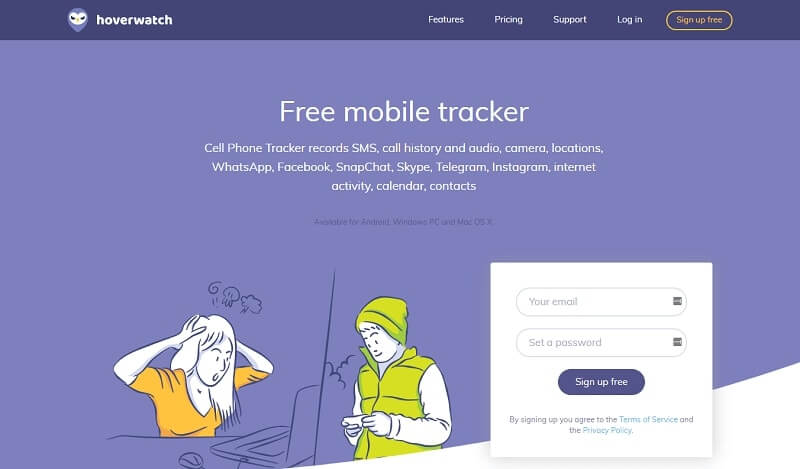
Hoverwatch is a multi-platform tracking solution designed to monitor activity across Android devices as well as Windows and Mac computers. Built to operate in the background, it offers a discreet way to collect and review device data without interrupting normal usage. The software provides a broad range of monitoring features, including tracking text messages (sent, received, and in some cases deleted), call history, contacts, calendar entries, and browsing activity. It also supports monitoring popular apps like WhatsApp, Facebook, Snapchat, Skype, Telegram, and Instagram, along with capturing GPS location data.
In addition to standard tracking, Hoverwatch includes advanced capabilities such as audio recording and camera capture, giving users more context about device usage. All collected data is automatically uploaded to a secure online control panel, where it can be accessed remotely at any time. This centralized dashboard makes it easy to navigate through different types of information and stay updated on recent activity.
With so many monitoring tools available today, choosing the right one can be challenging. Hoverwatch aims to stand out by combining ease of use with a comprehensive feature set. In this review, we’ll explore its functionality, performance, and key features to help you determine whether it meets your monitoring needs.
Main Features of Hoverwatch
Mobile Tracker – Android Features
App’s Running Undetectably
After you install the Hoverwatch App on the target device, the phone tracker app gets the most accurate information while remaining undetectable by the user of the monitored Android device.
Tracking Text Messages and Calls
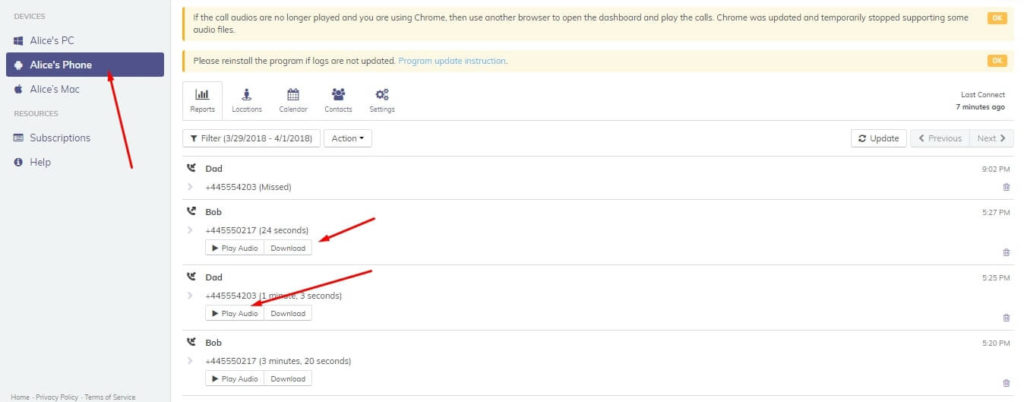
Hoverwatch allows you to track and record every outgoing and incoming call. You can view all SMS and MMS messages sent or received from the target phone as well. Moreover, you’re able to track the images included in the MMS messages and view them in your control panel.
Spying on Facebook/Viber/WhatsApp/Snapchat
You can spy and view messages, photos, and audio in the conversations of Facebook Messenger, WhatsApp, Snapchat, and Viber.

Geolocation Feature
You can track the target device’s location in your account so that you can know where the target person has been.
Front Camera Photo
You can remotely take photos with the front Camera with the help of Hoverwatch so that you can record some important information.
SIM Card Replacement
You will get a notification when the SIM card is charged to another one.
Phone Internet History
You can monitor all web activity that takes place on the target phone or PC: view internet history, and check the address, time, and date of visited sites.
Spying Todo list
Hoverwatch has a very useful feature – it can track a to-do list. Nowadays, it is definitely a necessity. People get used to making notes in their calendars and making plans. And Hoverwatch can show you this information.
Spying Contacts
Hoverwatch keeps track of all entries in the user’s address book. You can view all the contact details (numbers and names, emails, addresses, and so on) stored in the address book.
Taking Android screenshots
With Hoverwatch, the Android device can create screenshots periodically. So you’ll know more information from the screenshots.
Computer Tracker – Windows Features

Stealth and Undetectable
The Hoverwatch software works in the background, and it won’t be detected. It’s impossible to find the Hovewatch process in the task manager or in the “Start” menu among the installed apps.
Keyboard Logger
Hoverwatch contains a very important free feature – Keyboard Logger. It can track every action on a personal computer or laptop. It records all the pressed keyboard buttons and all the texts typed by a virtual or physical keyboard.
Webcam Shots
With Hoverwatch installation, you will be able to take photos from the camera that is installed on the laptop or connected to the computer, so that you can know who is using the target PC.
Logs Websites
The Keylogger for Windows developed by Hoverwatch can record the addresses of every website visited by the target computer user. The application saves clipboards, screenshots, keyboard activity, and camera shots.
Take Screenshots
You can take screenshots automatically to record the computer screen and get more information.
Facebook Messages and other Chats
When using the website to make conversations, like Facebook, WhatsApp, Instagram, and Twitter, you can get all the messages with Hoverwatch
Computer activity
It can also record all activities on the computer in chronological order: PC switching on/off, users logging in, the start of a program, and command-line parameters.
File tracking
Tracks file operations: creation, copying, transferring, and deletion. The operation parameters are saved: list of files, initial folder, folder settings, etc.
Skype recorder
Hoverwatch can not only track the calls made by Skype but also record the conversations.
Save Clipboard
The software developed by Hoverwatch records the whole history of the user’s clipboard activity. It allows loading as well as saving the content directly to or from a file. There are no problems with saving clipboards. You can see all the stored Information in a personal account.
Locations Tracking for Windows
If you want to check the location of your children or employees, do it easily by using the Hoverwatch application. It’s created to track tablets or laptops on a detailed map online. It collects information about the location of the target device automatically. The main sources of data are the signals from Wi-Fi spots and GPS systems. This tracker software helps to protect kids’ personal lives and businesses.
Computer Tracker – Mac Features

Keyboard Logger
Hoverwatch can monitor all actions on a Mac to record passwords, texts typed, contacts, search requests, and emails.
Regular Screenshots on Mac
The application takes the screenshots from the target Mac computer, and you can view them.
Internet History
Hoverwatch tracks all Internet activities so you can know the history of Internet browsing and all information about visited websites: URLs, pages, titles, time details, and so on. It supports tracking Apple Safari, Google Chrome, and Mozilla Firefox.
Is Hoverwatch Free?
Of course not. Without your purchase, how can Hoverwatch improve its services? You need to know that you need to buy Hoverwatch if you think it is what you need.
But you can get a 7-day free trial of Hoverwatch when you try it for the first time to try it. You’d better try it on your cell phone first to test all the features carefully to make sure it can help you spy on any mobile phone activities. Even after you get the full version of Hoverwatch, you can also use it on your mobile to confirm if it works or not.
Hoverwatch provides three pricing plans. You can choose the package that suits you most:
- Personal package: It is affordable and convenient for monitoring one device. You have to pay $8.33 per month if you buy a year’s license.
- Family package: if you want to monitor more than one device, you can choose a family package for 5 devices to save money. You should pay $3.33 monthly for one device if you buy a one-year license.
- Business package: Hoverwatch provides a business package for 25 devices, so you can choose this package to track 25 devices. You will be charged $1.67 per month per device for a one-year license. It is much lower than the personal package and family package for one device.
| License | Time | Device | Price |
|---|---|---|---|
| Personal License | for 1 month | for 1 device | $19.95 |
| Personal License | for 3 months | for 1 device | $49.95 |
| Personal License | for 12 months | for 1 device | $99.95 |
| Family License | for 1 month | for 5 devices | $39.95 |
| Family License | for 3 months | for 5 devices | $99.95 |
| Family License | for 12 months | for 5 devices | $199.95 |
| Business License | for 1 month | for 25 devices | $149.95 |
| Business License | for 3 months | for 25 devices | $299.95 |
| Business License | for 12 months | for 25 devices | $499.95 |
How useful was this post?
Click on a star to rate it!
Average rating / 5. Vote count: