In today’s hyper-connected world, ensuring the safety of children and managing device usage responsibly has become more challenging than ever. With smartphones and social media deeply integrated into daily life, kids are increasingly exposed to risks such as cyberbullying, inappropriate content, and online predators. At the same time, parents and employers need smarter ways to monitor digital activity without being overly intrusive. This is where MoniMaster positions itself as a powerful solution.
MoniMaster is a smartphone monitoring and parental control app designed to provide real-time insights into device activity while maintaining a level of transparency. Whether you’re concerned about your child’s online interactions or need to supervise company devices, the app offers a range of tracking and management features. From monitoring WhatsApp chat history to real-time location tracking and screen time control, MoniMaster Pro aims to deliver a comprehensive monitoring experience.
But having a wide range of features doesn’t automatically make a tool the right choice. Questions around usability, accuracy, privacy boundaries, and overall value still matter. Can MoniMaster truly balance effective monitoring with responsible usage? And is it suitable for your specific needs? In this review, we’ll take a closer look at its key features, performance, and real-world applications to help you make an informed decision.
What is MoniMaster?
MoniMaster is a powerful mobile monitoring application designed primarily for parents who want to better understand and manage their children’s smartphone activities. As digital exposure continues to grow at a young age, tools like MoniMaster aim to provide a practical way to supervise usage while helping parents stay informed about potential online risks.
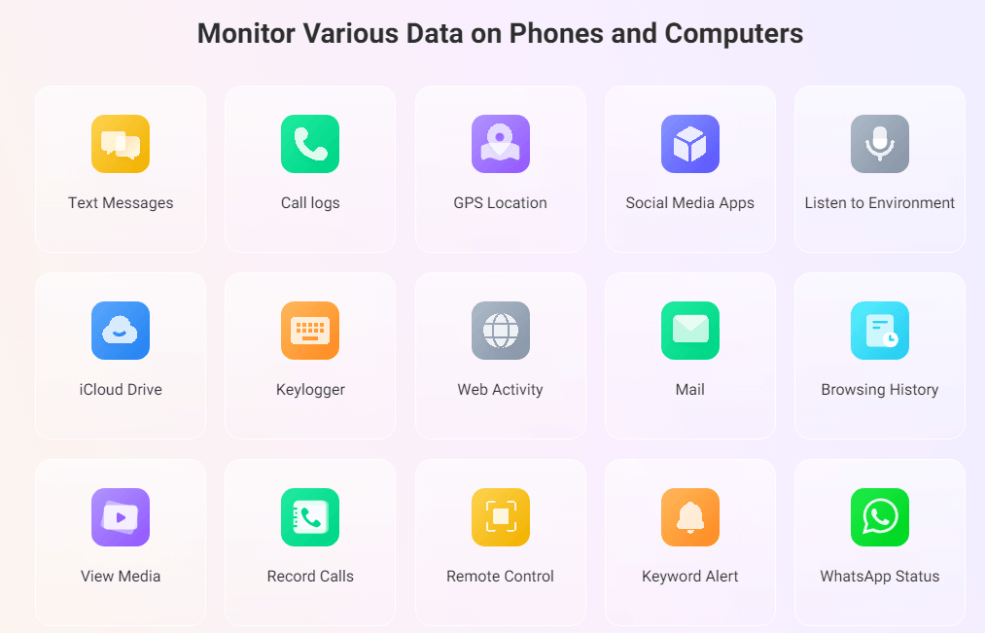
The app comes equipped with more than 25 advanced monitoring features, allowing users to track a wide range of activities on a target device. These include access to text messages, call logs, browsing history across multiple browsers, and real-time location tracking. In addition, MoniMaster supports monitoring of popular social media platforms such as WhatsApp, Instagram, and Kik, making it easier to gain a comprehensive view of a child’s digital interactions.
To function effectively, MoniMaster needs to be installed on the target device. Once set up, it securely collects data and uploads it to an online dashboard. Parents or subscribers can then log in through any modern web browser to view detailed reports and activity logs anytime, from anywhere.
Another key advantage of MoniMaster is its compatibility with both Android and iOS devices, ensuring flexibility for different users. Combined with its user-friendly interface and diverse tracking capabilities, MoniMaster positions itself as a comprehensive solution for modern parental control and smartphone monitoring needs.
Key Features of MoniMaster (What Can It Do?)
MoniMaster offers a comprehensive suite of monitoring and parental control tools designed to give users full visibility into a target device’s activity. With its wide range of features, it helps parents and guardians track communication, location, app usage, and more—all from a single, easy-to-use dashboard.
Social Media & Online Behavior Monitoring
MoniMaster Pro delivers in-depth monitoring of social media platforms such as Facebook, Instagram, WhatsApp, Snapchat, TikTok, LINE, Telegram, Viber, and Kik. Parents can review private messages, activity logs, and user interactions, giving them a clear view of their child’s online behavior. This feature helps identify potential threats, prevent exposure to harmful content, and promote safer, more responsible social media usage.
Instant Message Tracking
Access detailed chat histories from various messaging apps, allowing you to review sent, received, and even deleted messages.
Real-Time Location Tracking
Monitor the live GPS location of the target device and view detailed location history for better awareness of movements.
Family Location Sharing
MoniMaster Pro includes a family location sharing feature that enables parents to track their children’s real-time whereabouts with ease. This function provides continuous location updates, helping ensure safety during daily activities such as commuting to school or traveling. It offers peace of mind by allowing parents to stay connected and informed about their child’s location at all times.
Online Time Management
MoniMaster also helps parents manage and control screen time effectively. It allows you to monitor how long a child spends on their device and on specific apps, helping prevent excessive usage. By promoting healthier digital habits, this feature supports better focus, sleep quality, and overall well-being, ensuring that children maintain a balanced relationship with technology.
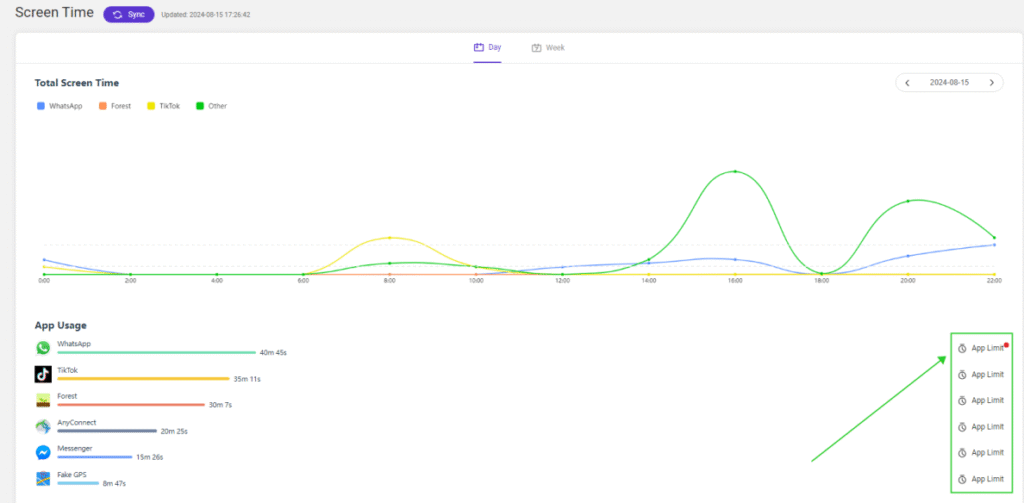
Device Linking & Remote Access
MoniMaster Pro allows parents to seamlessly link their child’s phone to their own device, enabling real-time access to digital activities. Once connected, parents can monitor usage, messages, and app interactions from a centralized dashboard. This feature ensures continuous visibility and helps parents stay informed about their child’s online behavior anytime, anywhere.
Inappropriate Content & Sexting Protection
MoniMaster Pro provides advanced filtering tools to detect and block inappropriate content, including adult websites and harmful messages. It can also identify potential signs of sexting or unsafe interactions and send alerts to parents. This proactive protection helps prevent risky behavior and allows timely intervention, while also enabling parents to block specific apps or websites to ensure safer device usage.
Geofencing Alerts
Set specific safe or restricted zones and receive instant notifications when the device enters or exits these predefined areas.
Call Logs Monitoring
View complete records of incoming and outgoing calls, including contact details, call duration, and timestamps.
SMS Tracking
Read text messages sent and received on the device, with full conversation details and time logs.
App Usage Monitoring
Analyze which apps are installed, how often they are used, and the duration of usage to understand screen habits.
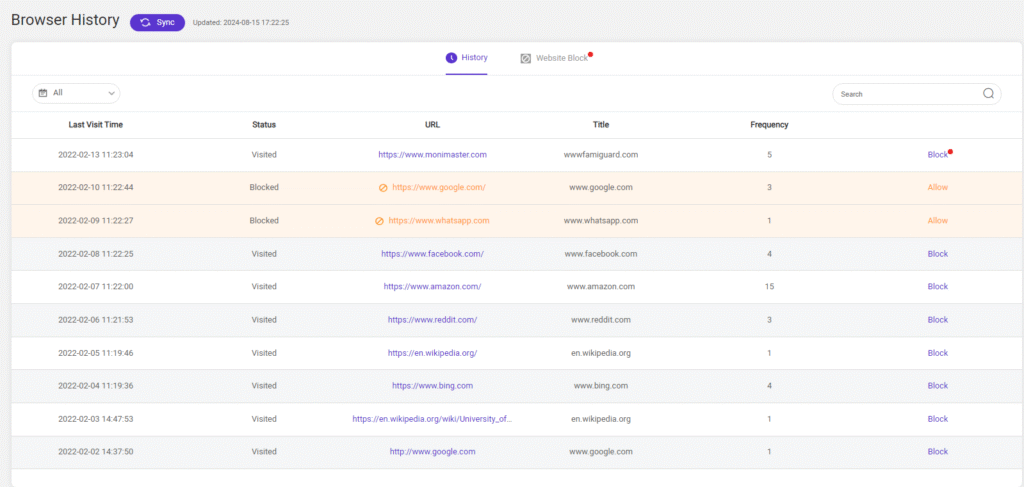
Web Browsing History
Check visited websites, bookmarks, and browsing patterns across different browsers to identify online behavior.
Keylogger Function
Record every keystroke made on the device, capturing search inputs, login credentials, and typed messages.
Media & File Access
Access photos, videos, and other files stored on the device, giving you visibility into all saved media content.
How to Use MoniMaster to Track Someone’s Phone without Knowing
Step 1: Create an Account
Start by registering a MoniMaster account. Once your account is created, you can connect it to the target device you want to monitor, such as your child’s smartphone.
Step 2: Install MoniMaster on the Target Device
Download and install the MoniMaster application directly on the child’s phone. The installation process is quick and simple, typically taking only a few minutes to complete.
Step 3: Configure Monitoring Settings
After installation, customize the monitoring options based on your needs. You can enable tracking for social media apps, set up website restrictions, activate location tracking, and choose specific activities you want to monitor.
Step 4: Start Monitoring via Dashboard
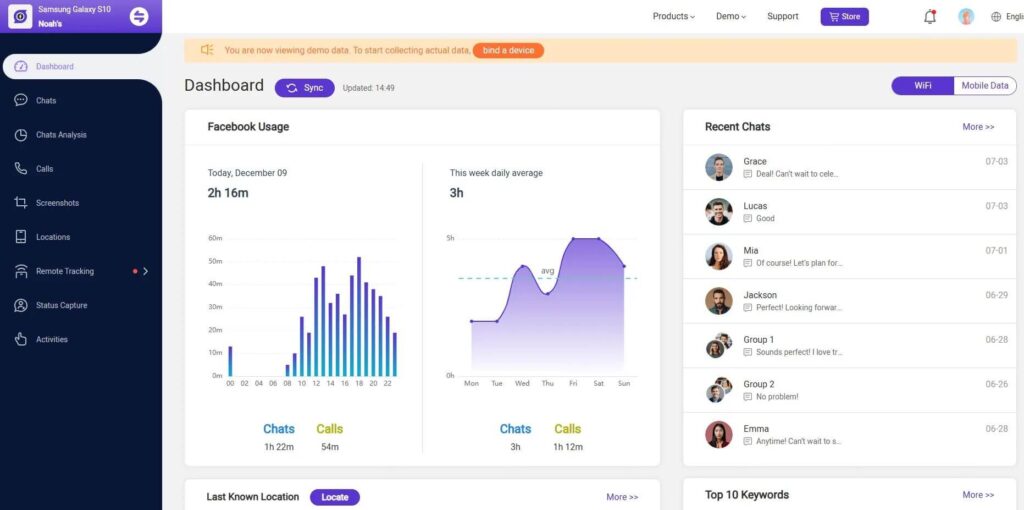
Once everything is set up, you can access the MoniMaster dashboard from any smartphone or computer. From there, you can view real-time data, track activities, and receive alerts for suspicious behavior or keyword triggers such as inappropriate content or risky conversations.
Pros & Cons of MoniMaster
Pros
- Comprehensive Feature Set: MoniMaster offers a wide range of advanced monitoring features for both Android and iOS devices, covering everything from messages to location tracking.
- Stealth Mode Operation: The app runs discreetly in the background, making it difficult to detect on the target device.
- Real-Time Monitoring: Provides instant updates on device activity with a quick and straightforward setup process.
- Cross-Platform Compatibility: Works smoothly across Android and iOS systems, giving users flexibility regardless of device type.
- Disappearing Message Tracking: Capable of capturing messages from apps like Snapchat, including content that is typically deleted or disappears.
Cons
- Limited iOS Functionality: On iOS devices, monitoring relies on iCloud backups, meaning real-time tracking is limited unless the device is jailbroken.
- Requires Physical Access (Android): Initial setup on Android devices requires direct access to the target phone, which may not always be convenient.
- Subscription-Based Pricing: The service can be more expensive compared to basic parental control apps on the market.
- No Free Trial: Users cannot test the app for free before committing to a paid plan, which may be a drawback for some.
MoniMaster Alternative: Why Consider mSpy?
While MoniMaster offers a wide range of monitoring features for parental control, it may not be the perfect fit for everyone. Some users may look for more flexible pricing options, broader device compatibility, or more advanced real-time tracking without relying heavily on backups or initial device access. In addition, different users have different priorities—some may value deeper social media insights, while others may focus more on ease of use or remote setup convenience. This is where exploring MoniMaster alternatives becomes important.
mSpy is one of the most popular alternatives to MoniMaster, and is a well-established parental control and phone monitoring solution.
mSpy is widely recognized for its user-friendly interface and strong set of tracking features, including call logs, SMS monitoring, GPS location tracking, and detailed social media activity reports. It also supports stealth mode operation, allowing monitoring without disrupting the user experience on the target device.
A key advantage of mSpy is its relatively simple setup process and stable performance across both Android and iOS devices. It also offers flexible, remote-accessible monitoring dashboards, making it convenient for parents who want real-time insights from anywhere. Additionally, mSpy provides strong customer support and detailed guidance, making it more accessible to non-technical users.
Overall, mSpy serves as a reliable alternative to MoniMaster, especially for users who prioritize simplicity, stability, and comprehensive monitoring in one platform.
Frequently Asked Questions (FAQs)
1. Is MoniMaster safe to use on Android devices?
Yes. MoniMaster is designed to be safe and stable on Android devices, offering reliable tracking features while running smoothly in the background without affecting normal phone performance.
2. Does MoniMaster drain the phone battery?
No. The app is optimized to consume minimal battery power. Since it operates in stealth mode, it runs quietly in the background without significantly impacting device performance or battery life.
3. Can I monitor multiple devices with one subscription?
No. Each MoniMaster subscription is linked to a single target device. If you want to monitor multiple devices, you will need to purchase additional licenses for each one.
4. Can I monitor an Android phone from my iPhone?
Yes. You can access and monitor an Android device from your iPhone using the MoniMaster dashboard. All data can be viewed remotely through a browser-based control panel.
5. Do I need technical skills to use MoniMaster?
No. MoniMaster is designed with a user-friendly interface, making it easy for non-technical users to install, configure, and start monitoring within minutes.
6. Can MoniMaster work without being noticed on the target device?
Yes. Once installed, MoniMaster runs in the background in stealth mode, making it difficult for the user of the target device to detect its presence.
Conclusion
MoniMaster stands out as a comprehensive parental control and monitoring solution designed to help parents navigate the challenges of raising children in today’s digital world. With its wide range of features, including real-time location tracking, social media monitoring, call and message logs, app usage insights, and even keylogging capabilities, it provides deep visibility into a child’s online activities. This allows parents to better understand how their children are using their devices and respond quickly to any potential risks.
Beyond simple monitoring, MoniMaster also focuses on proactive digital safety. Features such as online time management, geofencing alerts, and inappropriate content detection help parents establish healthy screen habits while protecting children from harmful online exposure. Its stealth operation and remote dashboard access make it convenient to use without disrupting daily device usage.
Overall, MoniMaster is more than just a tracking tool—it is a digital parenting assistant that supports safer online behavior and gives parents greater peace of mind in an increasingly connected environment.
How useful was this post?
Click on a star to rate it!
Average rating / 5. Vote count: