Wondershare FamiSafe is designed to give parents a balanced way to supervise their children’s digital activities without crossing the line into excessive intrusion. Developed by Wondershare Technology, this app focuses on creating a safer online environment while still respecting a child’s sense of independence. Instead of aggressive monitoring, it emphasizes guidance, awareness, and healthy device usage habits.
With FamiSafe, parents can set screen time limits, track daily activity reports, and apply web content filters to block inappropriate sites. These features help families build better digital routines and reduce exposure to harmful content. The app also offers location tracking and alerts, allowing parents to stay informed about their child’s whereabouts in a non-invasive way.
One of its key advantages is the availability of a free trial, which allows users to explore its features and ensure compatibility with their devices before committing to a subscription. This makes it easier to evaluate whether the app aligns with specific family needs.
FamiSafe is particularly suitable for parents who prioritize safety and digital well-being over deep message or call monitoring. It provides a practical, easy-to-use solution for encouraging responsible smartphone usage.
What is FamiSafe?
Wondershare FamiSafe is the most reliable parental control app on the market. FamiSafe helps parents track the location of their children in real time, protect their children’s online safety, and limit screen time on mobile devices to help them have healthy digital habits.
In 2021 alone, FamiSafe was honored with Best Innovative Tech Product for Children 2021, Made for Mums Awards 2021 (Bronze), and Family Choice Awards 2021 (Winner). These awards recognize FamiSafe’s dedication to providing innovative solutions that empower parents and help children stay safe and connected. Moreover, Famisafe was highly praised by the National Parenting Product Awards and Mom’s Choice Awards. The app also has the National Parenting Center’s Seal of Approval. With over 14,000 reviews on Google Play, FamiSafe has a rating of 4.5.
How Does FamiSafe Work?

FamiSafe works by tracking your child’s online activity and monitoring their behavior. It can be used to monitor multiple children’s activities from one account, and it also offers a variety of features that allow parents to customize the app to their family’s needs. You can set up alerts for certain keywords, and FamiSafe will notify you when your child searches for or views these keywords. You can also set time limits for each app on your child’s phone, and FamiSafe will notify you when they have reached their limit.
Families can also track their child’s location in real-time. Moreover, parents can use the Geofences feature to create a safe zone around their homes. If your child leaves this safe zone, FamiSafe will notify you. Moreover, parents can use the app to monitor their child’s phone calls and text messages. They can also set up filters to block certain words or contacts from appearing on their child’s phone.
FamiSafe’s Installation
To get started, install the app on your and your child’s smartphone, create an account, and assign a role to each device. The kids’ device would then act according to the rules you set. This is achieved by granting Famisafe permission to control your child’s phone. On Android, it is done by enabling Device Administrator permissions, and on iOS by installing the Famisafe MDM profile.
FamiSafe’s Features
FamiSafe has 7 key features that make it a complete package that ensures your child’s safety. While some of the features are natively included in iOS, such as Screen Time, it doesn’t tell you what your kids are doing in those apps. For example, you would be able to see that your child spent 5 hours on YouTube on Screen Time, but you would have to manually access your child’s phone. I’d be taking a look at all the features and how well it works with iOS and Android.
Screen Time
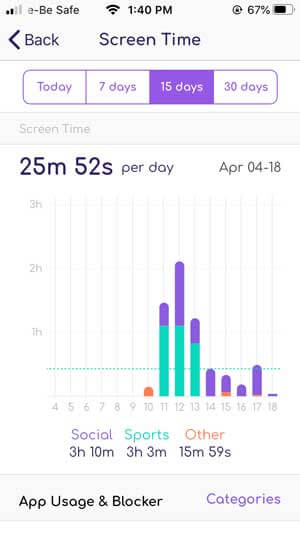
While Screen Time is built natively into iOS, and you have Digital Wellbeing on Android, you need to access your kid’s smartphone to do that. With Famisafe, you can access that data from your device and see how much time they spend watching YouTube and playing games. Not only that, you can block an app with a simple swipe if they spend too much time on a single app.
To help easily visualize things, Screen Time is plotted on a bar graph with categories represented with different colors, and you can view the data for the past 30 days.
Activity Report
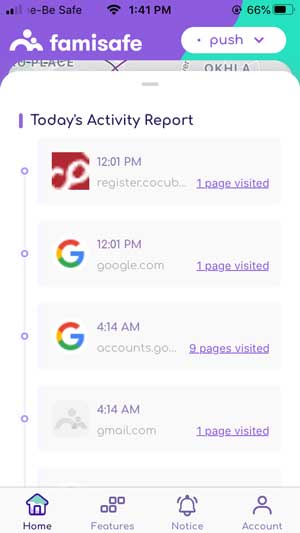
Activity Report is a Famisafe exclusive feature that allows you to see everything that happened on your child’s screen.
For example, it gives you a timeline of which apps were opened on your kid’s phone, how much time they spent on that app, and then moved to which app. The report is stored separately, and you can simply tap the date to retrieve the information.
Website Filter
The internet is where things get tricky. As a child, they may unknowingly click on an unsuspecting web link and find inappropriate content. You can actively set filters that would prevent them from stumbling on those websites even if they try.
The app has predefined categories such as violence, Drugs, adult content, etc. You can simply enable that category, and that category would be blocked. If there are some exceptions to this filter, you can add those manually as well. It’s really simple.

Location Tracking
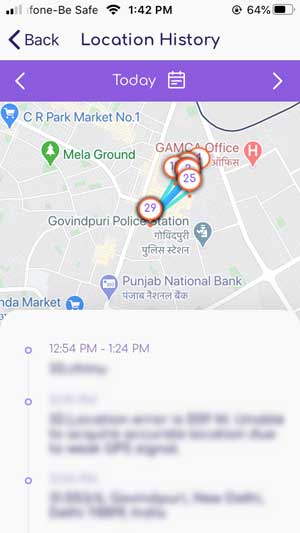
FamiSafe allows you to track the exact location of your child’s smartphone right from the app. What’s even more impressive is that you can set up geofences so that the app will alert you if they move out of the designated area. For example, if you sent them for a sleepover at a friend’s house, you can set up a geofence for that location. And if they go outside the area, you’d be alerted.
Detect Suspicious Content
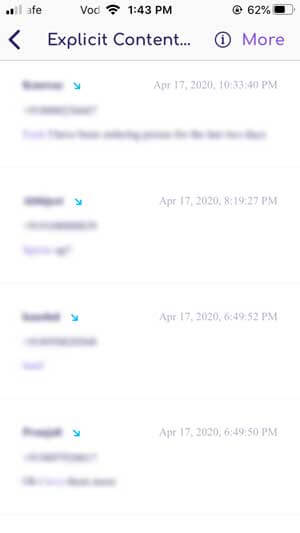
Messaging apps are really popular among young children and can be a hotspot for bullying. Famisafe can detect certain keywords such as abusive language, curse words, inappropriate words, etc. You would have to manually feed the words to the app. Once set up, you would receive a notification every time the keyword is used in a message. It would also let you know who said it.
FamiSafe’s Pricing
If you want to try FamiSafe before you buy it, you can use the software for three days with limited features. If you want to use all of the features in the software or use it for longer than three days, you can upgrade to the FamiSafe Premium version.
- Monthly plan – $10.99 per month (5 devices per account)
- Annual plan – $60.99 per year (10 devices per account)
- Quarterly plan – $20.99 per quarter (10 devices per account)
If you want your FamiSafe premium subscription to renew automatically, you must pay with a credit card or PayPal. If you use a debit card, digital wallet, convenience store, or cash on delivery to pay for your subscription, it will expire at the end of the term.
Moreover, if you are not satisfied with your purchase, Wondershare has a seven-day money-back guarantee. If you bought the FamiSafe tracker from Google Play or the App Store, you will need to request a refund from that platform.
Pros & Cons
Pros
- Instant updates on the kid’s activities
- Inexpensive compared to other spying apps
- Supports multiple devices
- No need for rooting or jailbreaking
- Easy control of the kids’ devices remotely
- Simple interface
Cons
- Web filtering doesn’t work properly
- Accessibility gets stuck in some Android phones quite often
- In some phones, Famisafe can be deleted like other normal apps, but you’ll get notified
- The suspicious features function doesn’t work properly
FAQs
1. Is Wondershare FamiSafe software safe?
Yes, FamiSafe software is a safe way to keep your family safe while online. The software doesn’t retain or leak your personal information, so it’s safe and secure.
2. How much does FamiSafe software cost?
The cost of FamiSafe software hinges on the number of devices and the plan you choose. It costs $9.99 per month to install the software on five devices. For $59.99, parents can install the software on up to 30 devices and receive coverage for an entire year.
3. Can a kid turn off FamiSafe?
Kids can uninstall the FamiSafe app without parental consent on iOS devices. However, FamiSafe has uninstallation protection on other devices, preventing the child from uninstalling the app without the FamiSafe account password, PIN code, or Uninstall password.
4. Is FamiSafe Detectable?
Yes, FamiSafe is detectable, and it is not hidden on the target phone. Since it is a legit parental control app, it is not made to spy on someone; rather, it is used by parents to monitor their child’s phone activity. Unlike other spyware whose icons are hidden on the target phone, the FamiSafe app icon is visible. But don’t worry, even if your kid detects the FamiSafe app, they can’t uninstall it without your permission.
Conclusion
In conclusion, Wondershare FamiSafe offers a well-rounded and affordable solution for parents who want to create a safer digital environment for their children. Its core features—such as web filtering, detailed activity reports, screen time management, and real-time location tracking—make it a practical tool for everyday parental supervision. The addition of geofencing alerts further enhances its value, allowing parents to receive notifications when their child enters or leaves specific areas.
FamiSafe is particularly effective for families focused on promoting healthy device usage and protecting children from inappropriate online content. Its intuitive interface and structured dashboard make it easy to monitor activity without requiring advanced technical knowledge, which is a major advantage for many users.
However, it’s important to recognize its limitations. Unlike some other monitoring tools, FamiSafe does not provide access to call logs or message content, which may be a drawback for those seeking more in-depth communication tracking.
Overall, if your priority is safety, screen management, and location awareness rather than detailed message monitoring, FamiSafe remains a reliable and cost-effective choice—especially with its annual subscription offering long-term value for families.
How useful was this post?
Click on a star to rate it!
Average rating / 5. Vote count: