
Modern technology has become an essential part of daily life, shaping how we communicate, learn, and spend our free time. Social media platforms like Instagram, TikTok, and Snapchat are especially influential among teenagers, offering entertainment, connection, and self-expression. However, this constant access can also lead to excessive screen time and reduced awareness of how these platforms affect their well-being.
Many teens may spend hours scrolling, chatting, or consuming content without realizing the potential downsides, such as distraction from studies, exposure to inappropriate material, or negative social comparisons. As a result, parents face the challenge of guiding their children toward healthier digital habits without completely restricting their independence.
This is where parental control tools and strategies play a crucial role. By combining education with the right technology, parents can help teens understand both the benefits and risks of social media. Setting boundaries, monitoring usage, and encouraging open conversations can create a balanced approach. In this guide, we’ll explore the best parental controls for teen social media use and how they can support safer, more mindful online experiences.
Social networks are essential in our connected world. We have compiled a list of the top 10 social media apps around the world.
Created in 2004 by Harvard student Mark Zuckerberg, Facebook has become the largest social network and the second most visited website in the world. The American company in Menlo Park, California, has more than a billion users daily. The great strength of Facebook lies in the diversity of shared content.
X(Twitter)
The second-largest social network among the popular social media apps in the world. Twitter favors speed and conciseness, with messages limited to 140 characters. Ideal for communicating quickly and following the news in real-time. It has 336 million monthly active users worldwide.
Since its appearance, many people have been using Instagram, one of the most popular social media apps for business. It is a visual platform, mainly using videos and images. More than 600 million active users share most food, art, travel, and fashion photos every minute.
WhatsApp is the most popular instant messaging application in the world because of its ease of use and the various features offered. It is the social network most used today, as revealed by a survey conducted on the uses and influences that networks have on people’s habits.
YouTube
YouTube, the largest video-sharing platform, could become a social network with status and photos. It is now the coolest social network among teenagers. With over a billion users, YouTube is a must-have on the web where subscribers watch millions of hours of content every day.
It is a professional tool number 1. It has about 106 million users worldwide. It allows exposing its course to be spotted by recruiters. Become essential, LinkedIn has been enriched with several interesting features.
Google+
While it is already shunned by Internet users, everything indicates that Google+ is no longer at the center of Google’s concerns. This social network, created in 2011 to compete with Facebook, will become a “niche” network. It is an elegant way to steer it towards a siding.
Pinterest is, without a doubt, a social network based on the sharing of images. The management of this network requires the work of curating content. This is the reason why most users access Pinterest from the desktop, where the screen is larger.
Tumblr
This small blog site gathers more than 140 million blogs dedicated to practically any topic. The content of Tumblr, which is aimed at those who post images and quick and funny messages, is not as long as that of traditional blogs. According to Tumblr, more than 82 million posts are published every day on the site’s blogs.
Quora
Quora, a popular social media app, basically consists of a social network of questions and answers, in the style of Yahoo Answers but improved, since a rather efficient system has been built that avoids that there are duplicate questions and maintains the quality of the content.
We hope this list of top 10 social media apps helps you save time in the management of social networks by mechanizing and automating certain processes.
Teens are wasting a lot of time on social media apps
Modern technology has undoubtedly endowed the younger generation with contemporary phones, tablets, and pads, and other devices connected to the internet. They use modern devices and machines to have fun. Cheat chat, deliver text messages, share videos, make calls, and so many loving activities to spend quality time, waste time, and share their opinions and thoughts remotely with their friends.
Children under the age of 13 have their own opinion that if they start receiving several notifications, it would be distracting, time-consuming, and very hectic to manage. Most of the time, it takes them a lot of time on popular social media apps like Facebook, Yahoo, WhatsApp, and other platforms. It would then be obvious that they will have health problems such as depression, anxiety, lack of social behavior, aggressive behavior, and poor academic performance.
Being too addicted to popular social media apps is very harmful to our teens. It has numerous negative effects. Using parental controls like mSpy could be a great solution to get rid of this problem. Those parents who want to protect their children who browse the internet should use the best parental control – mSpy. It has complete functions of modern operating systems that can track the top 10 social media apps depicted above.
mSpy Parental Control Features:
- Track real-time location on iPhone and Android.
- Block apps without knowing.
- Block unfitting websites remotely.
- Track messages on Facebook, WhatsApp, Instagram, LINE, Snapchat, and more.
- View the photos and videos on your kid’s cell phone.
- Smart Settings for flexible control
Pros:
- Comprehensive social media monitoring: Tracks messages and activity on platforms like WhatsApp, Instagram, Snapchat, TikTok, and more.
- Detailed insights: Provides access to chats, contact info, timestamps, and sometimes deleted messages.
- Screen time management: Helps parents control device usage and set healthy digital limits.
- Real-time tracking: Includes GPS location tracking and geofencing alerts.
- User-friendly dashboard: Easy to navigate, even for non-technical users.
Cons:
- Limited features on iOS: Some advanced functions may require iCloud access or have restrictions compared to Android.
- Requires initial setup access: Installation may need physical access to the target device.
- Subscription-based pricing: Full features are only available with paid plans.
- Privacy concerns: Requires responsible use and clear communication with teens.
How to set up mSpy to block social media apps
All you need to do is follow these steps:
Step 1. To get started, register your mSpy account first.

Step 2. Then install the mSpy app on your kid’s cell phone, and set it up.
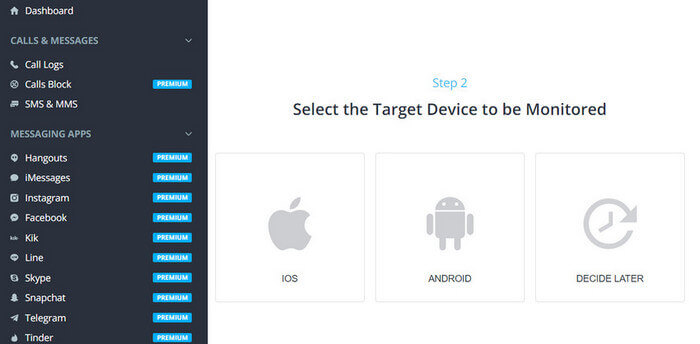
Step 3. Log in to your mSpy account now, and you can block the social media apps you want, such as Facebook, Instagram, WhatsApp, Snapchat, LINE, Telegram, Tinder, etc.

More features:
mSpy can monitor the top 10 social media apps we mentioned earlier. It can monitor the usage of the apps very successfully. It also has other wonderful features. It can track the location history of your kids. It can set and monitor geofences.
Especially among young teenagers, we have seen heavy infatuation with popular social media apps. They send hour-to-hour text messages, make calls from the morning until the end of the cell phone battery, make video calls, and some use the internet to have fun. Several studies have begun to investigate the effects of social media on users. By now, many psychologists have detected symptoms such as anxiety, stress, and depression in the obsessive use of the top 10 social media apps, as we listed above. We must protect our children from the negative consequences of social media by using the leading parental control application, mSpy.
How useful was this post?
Click on a star to rate it!
Average rating / 5. Vote count: