TikTok has quickly become one of the most popular platforms among teenagers, offering a space where users can create short videos, express creativity, and engage with a global community. Its entertaining format and easy-to-use tools make it highly appealing, especially for younger audiences who enjoy sharing trends, music, and personal moments.
Despite its benefits, TikTok also presents certain challenges for parents. With millions of active users—many of them in their teens—there is a wide variety of content available, and not all of it is suitable for younger viewers. Exposure to inappropriate videos, online interactions with strangers, and excessive screen time are some of the common concerns families face.
As a result, many parents are looking for effective ways to guide their children’s use of the platform without completely restricting their experience. Setting up parental controls is a practical solution that allows parents to manage privacy settings, limit screen time, and filter content. By understanding how these controls work, you can create a safer and more balanced TikTok experience for your child. In this guide, we’ll walk you through the steps to set up parental controls and use TikTok more responsibly.
Part 1. Is TikTok Safe for Kids?
Generally speaking, TikTok is safe for developing the creative skills of children, as kids can use it for informational videos, knowledgeable quotations, and moral lessons. However, as each coin has two sides, there are still some things that parents should be concerned about.
Cyberbullying
Cyberbullying has become a common issue in the digital world nowadays. It’s not difficult to find news that says teenagers got upset, even depressed, due to the large number of aggressive comments they receive for the videos they post to social media platforms like TikTok.
Tech Addiction
Tech addiction is another side effect that TikTok may bring about, and children don’t have a proper schedule for its usage. Kids don’t have good self-control, and it’s hard for them to decide whether it’s time to put their phones done to have a rest.
Class Distraction
Kids who spend a lot of time on social apps like TikTok are more likely to be distracted in class, according to a recent survey. It would be much easier for them to think about the videos they watched last night instead of paying attention to the lesson.
Social Loneliness
Social loneliness is also a side effect that TikTok may cause. More time on social apps instead of hanging out with friends could make them lose friends in real life. It is a troublesome complication for the kids, as they will go into depression due to social loneliness.
Part 2. Is There A Way to Put Parental Control on TikTok?
As one of the most famous video-sharing apps in the world, TikTok has noticed the side effects that TikTok may bring about to little kids as well. Regarding this, it released the Parental Control feature —Family Pairing, to help parents protect their kids’ digital safety on TikTok.
Parents could link their kids’ accounts and set controls, including Screen Time Management, Restricted Mode, Search, Discoverability, Suggest accounts to others, Direct Messages, Liked Videos, and Comments.
How to set up Family Pairing?
1. Open TikTok and click the Profile icon at the bottom right of the screen
2. Tap Digital Wellbeing
3. Tap Family Pairing
4. Choose whether it’s the Teen’s account or the Parent’s
5. Click Continue, then follow the instructions to finish the connection
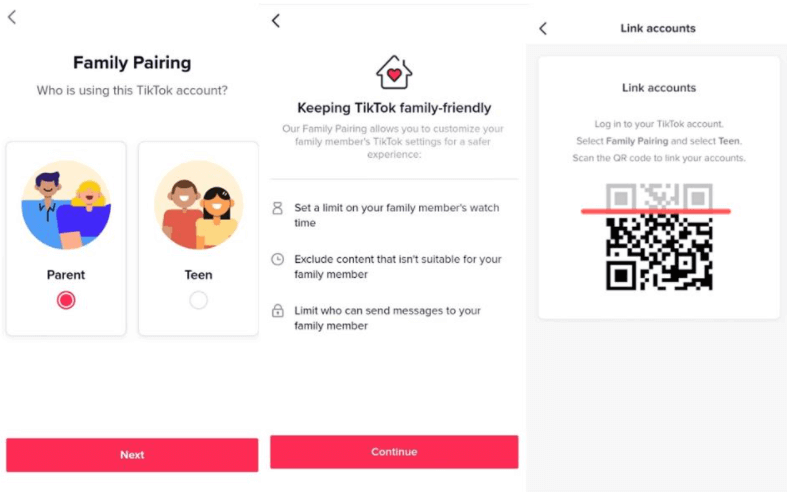
After setting up Family Pairing, parents could restrict kids’ TikTok activities on setting sections like setting screen time, and so on.
Part 3. mSpy — An Alternative for TikTok Family Pairing

Apart from setting up TikTok Family Pairing, another way is to use parental control apps like mSpy to monitor kids’ TikTok activities. This app is not only to protect your kids from TikTok’s inappropriate information but also the content from any kind of app and even the entire device.
App Blocker
When you notice that your kids have spent a lot of time on TikTok or other games, and it’s unable to stop it by negotiation, you could block the app or several apps with just one tap.

TikTok History
This feature could make it possible to view kids’ TikTok History remotely and check their TikTok watch history on a specific date. No need to get access to your kids’ devices; you can check the TikTokers, hashtags, and descriptions for the videos they watched. Of course, you could watch the videos directly as well with this feature. In this way, it would be much more convenient for you to check whether any inappropriate information has been posted about your kids or not.
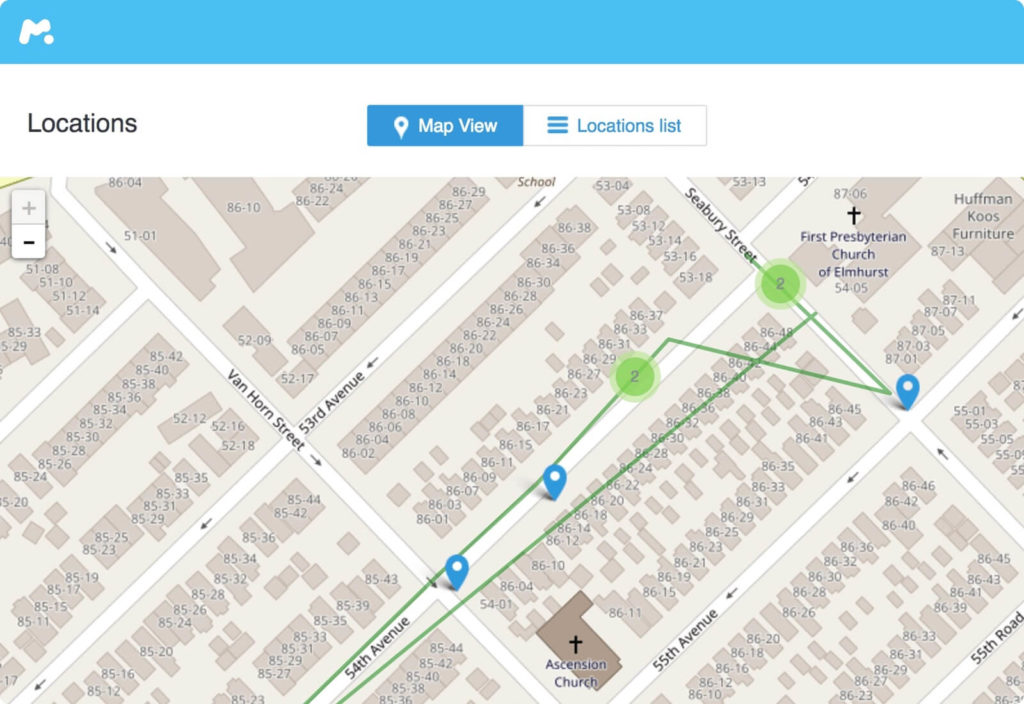
Location History
Another fantastic feature of mSpy is its Location History. By connecting your device with your kids, you could check where your kids are located all the time and where they have been. No need to worry that they may meet online partners privately when you’re not at home, or hang out with friends when they should be at school. It could also help you check whether your kids have arrived at their destination safely.
Screen Time
If you’re busy with work all the time, you could use this feature to set a scheduled screen time to avoid your kids excessively using tech devices or one specific app. You don’t need to keep an eye on your kids; just a pre-setting could free you from future worries.
Conclusion
TikTok offers a fun and creative space for children to express themselves through short videos, music, and interactive content. Its popularity among younger users makes it an engaging platform, but it also requires careful supervision. Not all content on TikTok is suitable for kids, and excessive usage or exposure to inappropriate material can have negative effects if left unchecked.
That’s why parents need to take an active role in managing how their children use the app. Built-in parental controls on TikTok can help limit screen time, filter content, and manage privacy settings. In addition, tools like mSpy can provide deeper insights into device activity, allowing parents to monitor usage patterns and stay informed about their child’s digital behavior.
By combining TikTok’s native controls with external monitoring solutions and open communication, parents can create a safer and more balanced environment. Taking action early ensures that children can enjoy the platform’s creative benefits while minimizing potential risks and developing healthier online habits.
How useful was this post?
Click on a star to rate it!
Average rating / 5. Vote count: