
If Instagram keeps logging you out for no apparent reason, you’re not alone. Many users across both Android and iOS platforms have reported this frustrating issue—being randomly signed out of their accounts, sometimes multiple times a day. This can disrupt your browsing, posting, or messaging experience and, in some cases, even raise concerns about account security. Whether you’re casually scrolling through your feed or managing a business profile, being unexpectedly logged out can be annoying and stressful. The reasons behind this issue can vary widely, from app glitches and outdated software to corrupted cache, login from multiple devices, or even suspicious activity triggers from Instagram’s security systems.
In this guide, we’ll explore all the possible causes of Instagram automatically logging you out and provide clear, step-by-step solutions to fix the issue for good. We’ll cover common fixes such as clearing cache, updating the app, checking for third-party apps that might interfere with your login session, and reviewing your account’s security settings. Additionally, we’ll explain how to recognize whether this issue might be due to someone else trying to access your account and what to do in that situation. Whether you’re a content creator, business owner, or just a casual user, understanding how to troubleshoot and prevent this logout loop is key to maintaining a smooth Instagram experience. Let’s take a closer look at how to regain full control of your account.
The reasons why Instagram keeps logging you out
Nowadays, Instagram has become one of the most popular social media of all ages, and since Instagram added the business account to the settings, many businesses are keen to use it to boost their business. So, it is clear how vital it could be Instagram accounts are for individuals. However, this vast social media is changing its algorithm most often. Therefore, some errors or problems using it will arise. One of these reported problems is seeing the error while you are using Instagram on the phone, sometimes it suddenly logs you out and sends you back to the login page, and sometimes it shows the error that there was a problem with your request.
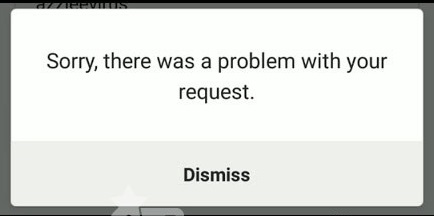
If you have any trouble while using the Instagram app, and it keeps you out while using it, here are the reasons and also the solutions. While we were considering the issue, we found that this is mostly happening for those who have added many accounts to their Instagram apps.
Moreover, a sudden log out from Instagram can be because of password changes, too. It means that if your password changes from any device, all other active devices will be inactive (or they will log out).

It seems that the other reason to face this issue was an Instagram bug. However, according to the Instagram help center, you should no longer receive this error. Though, in case you still have problems with this error, in the next section, I will explain some possible solutions to this kind of error on Instagram.
What to do if Instagram logs you out repeatedly?
Sudden logging out from an account on Instagram is indeed frustrating, but hopefully, we have researched this, and we have found some ways that could fix the issues.

Spy on Facebook, WhatsApp, Instagram, Snapchat, LINE, Telegram, Tinder and other social media apps without knowing; Track GPS location, text messages, contacts, call logs and more data easily! 100% safe!
The first solution is to remove other accounts from your login pages and add accounts again. The second one is that you should clear the cache from your mobile phone, which I will explain here.
# For iOS users:
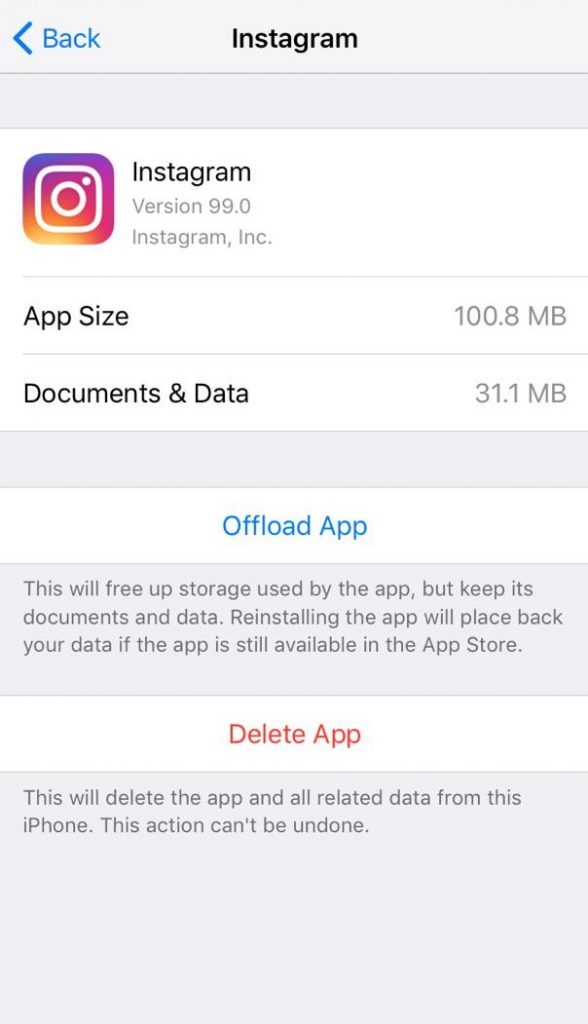
- Go to the settings> iPhone storage
Scroll down to the apps, find Instagram, and tap on it; you will see two buttons. The first is to offload the App and delete the App. Tap on the Offload App to get cash cleared. Clearing cash won’t affect your data and documents, and it just removes extra files in your apps. By tapping on offload apps, the application will be reinstalled on your device.
# For Android users:
The process is almost the same. Follow these instructions:
- Go to Apps > Instagram > Storage > Clear Cache
As I mentioned, changing your Instagram password from another device could log you out of your account. If you feel so, we highly recommend you go to the forgotten password section on the login page and try to reset your password through the information Instagram wants from you. If all the above tips do not help you, you should contact Instagram support to report the issue.
Conclusion
In conclusion, if Instagram keeps logging you out, it is often a sign that something is conflicting with your account settings, security preferences, or app data. The last recommendation is that while using Instagram, it is better to regularly review both your account security and privacy settings. If you set very strict privacy or security controls on your phone or within Instagram, such as frequent password resets, VPN usage, or aggressive background app restrictions, you may encounter more login interruptions, especially when accessing your account from multiple devices or locations.
It is also essential to ensure that your email address and phone number are verified and that two-factor authentication is configured correctly. If Instagram detects suspicious activity, unrecognized devices, or repeated failed login attempts, it may automatically log you out to protect your account. Keeping your contact information up to date helps you quickly confirm your identity and regain access when this happens.
Another smart step is to link your Instagram account to your Facebook account or Meta account center. This linkage not only simplifies authentication but also provides additional recovery options if you get locked out. Likewise, avoid sharing your password with third-party apps or untrusted services that promise followers or analytics, as they frequently trigger automatic logouts due to security violations.
Finally, regularly update the Instagram app, clear corrupted cache, and sign out from devices you no longer use. By combining these preventive measures—careful security settings, verified recovery options, trusted devices, and updated software—you significantly reduce the chances of being logged out unexpectedly. And if login issues do occur, these preparations will make recovering your account faster, safer, and far less stressful.
How useful was this post?
Click on a star to rate it!
Average rating / 5. Vote count: