Over the past few years, the demand for mobile monitoring solutions has grown significantly, leading to the emergence of numerous apps designed to track smartphone activity. These tools aim to provide users with insights into both online and offline behavior, offering access to communication data, app usage, and location information. As smartphones continue to store more personal and sensitive data, many users—especially parents and device owners—are looking for efficient ways to stay informed about how these devices are being used.
Among the many options available, XNSPY has gained attention as a feature-rich monitoring app for both Android and iOS devices. It is designed to operate discreetly while collecting a wide range of data, including text messages, call logs, browsing activity, and interactions across popular social media platforms. In addition, it offers GPS tracking and activity reports, helping users build a clearer picture of device usage over time.
What sets XNSPY apart is its extensive set of features combined with a relatively straightforward setup process. Once installed and configured, users can access all monitored data through an online dashboard, making it easy to review information remotely. XNSPY provides you with an extensive variety of features that let you become a full-fledged spy by yourself.
In this review, we’ll take a closer look at XNSPY’s features, performance, and overall value to help you determine whether it’s the right monitoring solution for your needs.
Why Choose XNSPY?
Well, there are three main reasons for selecting the XNSPY Android spy app. For starters, the app is easy on the pocket. You get to enjoy plenty of advanced features without breaking the bank. Secondly, you can remotely perform numerous functions on the monitored phone. Last, it is not only one of the apps to spy on Android phones, but works efficiently on iOS devices.
Read on to find out more about the app. We are going to discuss its installation process along with an in-depth analysis of the features.
XNSPY Android Spy App – How to Install?
You need to go to XNSPY’s official website and subscribe to the edition of your choice. After that, you will receive an email with the activation code, a download URL, and a guide to help you with the installation process.
To install the XNSPY Android spy app, you need to have physical access to the phone you want to spy on. Speaking of physical access, users should be wary of the Android spy apps claiming to offer a remote installation feature, as Android does not allow for such a feature that lets you install an app without having the phone.
Having said that, once you have physical access to the Android device, you simply need to click on the download URL to install the app on the device. XNSPY Android spy app runs smoothly on devices having OS between Android 4 and Android 9.
XNSPY – Price and Packages
XNSPY impressively caters to your spying needs by offering two packages that vary in price and set of features. There is a Basic edition that comes with the basic functionalities of a spy app, such as text messages, call logs, access to contacts, emails, and WhatsApp.
For more advanced spying features, users can opt for the Premium Edition. Moreover, the app allows the user to choose from a variety of subscriptions. They can choose monthly, quarterly, and annual pricing options.
Take a look at the chart below to see the breakdown of prices according to the editions:
| Editions | Monthly | Quarterly | Annual |
|---|---|---|---|
| Xnspy Basic Edition | $49.99 | $23.33 | $8.33 |
| Xnspy Premium Edition | $59.99 | $33.33 | $12.49 |
XNSPY’s Features
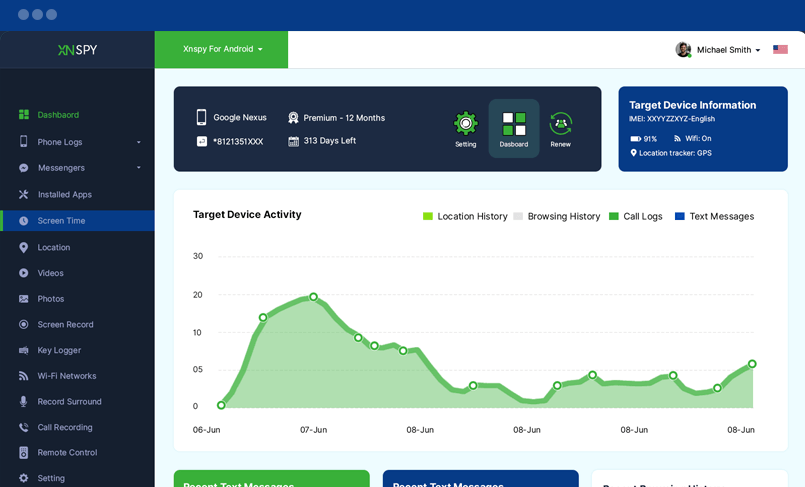
Whether it is a smartphone or a tablet you want to sneak into, the XNSPY Android spy app lets you access all the activities going on on the phone within 24-48 hours of installation. The app needs this time so that it can fetch the information from the phone and upload it to your web account, from where you can access it remotely. You will receive your login credentials in your email.
Let’s start with the basic features first.
Monitor Text Messages
Since texting is the preferred means of communication, you can get your hands on a lot of information by monitoring text messages. With XNSPY, you can access incoming and outgoing messages along with the contact details, date, and time. Not only that, but you can also view the chat conversations of IM chats, including Facebook Messenger, Instagram, WhatsApp, LINE, Kik, Skype, and Tinder.
You can add words and contacts to the Watchlist of the app and get automated alerts when any of those words or contacts appear in text messages, emails, or IM chats. This way, you can get intel on what you are interested in.
Monitor Call Logs
XNSPY grants you a detailed analysis of all the calls. The app records all the calls automatically. You can see the Top 5 callers and the Top 5 call durations. Also, you can see the weekly call activity punchcard to know about the time when the phone user talked on calls, both incoming and outgoing.
Access to Multimedia
Apart from calls and text messages, you would also want to see the kind of multimedia the phone user shares or receives on his phone. XNSPY takes care of that. You can access images, videos, and other files.
XNSPY – Advanced Features
XNSPY takes all the aspects of spying into account. Here is a list of the app’s advanced features:
Real-time GPS Location Tracking and Geofencing
XNSPY tracks the phone location in real time. Also, GPS location tracking, coupled with geofencing, lets you create virtual boundaries around the phone user’s whereabouts. You can add locations to the Watchlist and get alerts when the phone users enter or exit that zone.
View and Block Apps
With the XNSPY Android spying app, you cannot only view the installed apps on the phone but even block the ones you deem unsafe or inappropriate.
Monitor Internet and Web browsing activity
XNSPY lets you see the phone user’s internet activity. You can see the Top 10 most-visited websites and get to know the kind of content the phone user accesses on the internet.
You can monitor the web browsing history of the phone user with XNSPY. The app will get you the Top 10 most visited websites so you can get an insight into the phone user’s internet activities and the kind of websites he likes to visit.
SIM Card Change Alert
There is hardly an aspect this app fails to cover. The developers have thought of everything a person might be interested in knowing while using one of the apps to spy on Android phones. You can get alerts if the phone user switches the SIM card. You would get an alert right away. You would have to switch on this feature yourself.
Keylogger
Not many apps to spy on Android phones are available with this feature. The keylogger efficiently logs every keystroke the phone user makes while using:
- Facebook Messenger
- Snapchat
- Skype
- Viber
- Telegram
Offline monitoring
XNSPY does not stop recording data if there is no internet. The app smoothly monitors offline. It keeps on recording the data, and as soon as the device connects to the internet, it uploads the data to your web account, which you can access using the app’s dashboard.
Remote Features
XNSPY users can have remote control of the phone they are monitoring. The app provides numerous remote features. Here is a list of them:
- Live screenshots
- Access to address books
- View and block apps
- Remote lock of the phone
- Shut down the phone
- Listen and record the surroundings
- Wipe data from the phone
- Surround Recording
The app not only records calls but also lets you record the conversations and sounds around the monitored device. Through a remote command from the dashboard, you can turn on the microphone of the phone and record the surroundings for 30 minutes.
The phone user does not know about this activity, as all of this takes place silently and out of sight. The feature lets you record for 30 minutes. If you want to continue recording, you would have to send another command to the phone.
Wi-Fi Network Logs
You can view the Wi-Fi connections the device has recently connected to, along with the date and time of that occurrence.
Analysis Reports
Phones are used all day long, and it is difficult to go through every activity every day. To help you save time, you could get information from the different reports the app delivers, which are:
- Top 5 frequent callers
- Top 5 call durations
- Top 10 most frequently-visited websites
XNSPY – The Advantages
- The app is easy to use.
- The variety of features is impressive.
- The app is compatible with both Android and iOS.
- The price is affordable compared to other spy apps.
- You will find a demo version and tutorials on the site to help you with using the app.
- Customer support is helpful and available 24/7.
XNSPY – The Drawbacks
- XNSPY does not have a trial version.
- There is no option for a remote camera.
Conclusion
In conclusion, XNSPY stands out as a well-rounded monitoring solution that balances functionality, pricing, and usability. Its wide range of features makes it a practical choice for users who want detailed insights into smartphone activity without dealing with overly complex setups. From tracking messages and call logs to monitoring app usage and browsing behavior, XNSPY covers most essential monitoring needs in one platform.
What truly enhances its value is the inclusion of advanced tools such as geofencing, which allows users to set location-based alerts, a keylogger for capturing typed input, and ambient recording for gathering additional context from the device’s surroundings. These features provide a deeper level of monitoring compared to many basic alternatives on the market.
Another strong advantage is its affordability relative to the number of features offered, making it accessible for a wide range of users. Additionally, the availability of 24/7 customer support ensures that users can get assistance whenever needed, improving the overall experience.
Overall, XNSPY combines powerful capabilities with ease of use and reliable support, making it a solid option for anyone looking for an effective Android and iOS monitoring solution.
How useful was this post?
Click on a star to rate it!
Average rating / 5. Vote count: