WhatsApp has grown into one of the most widely used communication apps in the world, connecting millions of users through instant messaging, voice calls, and media sharing. Since its acquisition by Meta, the platform has continued to expand rapidly, becoming an essential part of daily communication for both adults and children. Its ease of use and global reach make it especially appealing to younger users.
However, this popularity also raises concerns for parents. As children spend more time on messaging apps, they may become exposed to risks such as cyberbullying, inappropriate content, or interactions with strangers. While WhatsApp itself is designed for secure communication, it cannot fully prevent misuse by individuals with harmful intentions. This makes parental awareness and guidance more important than ever.
Monitoring a child’s WhatsApp activity doesn’t necessarily mean invading privacy—it’s about ensuring their safety and helping them navigate digital spaces responsibly. By understanding how the platform works and what potential risks exist, parents can take proactive steps to protect their children. In this guide, we’ll explore whether WhatsApp is safe for kids, what aspects parents should pay attention to, and how to monitor usage effectively using available tools and methods.
Is WhatsApp safe for kids?
In the digital age, we cannot ignore the fruits of technology like our previous generation. Simultaneously, no parent would like to see their kids fall victim to various cyber crimes, as this is also an age of deception. Hence, most parents would ask, “Is WhatsApp safe for my kids?”
Well, you cannot stop them from using these kinds of socializing apps. Kids and teenagers nowadays place quite an amount of importance on communicating with their friends. What you can do is understand these apps and monitor your kid’s usage.
WhatsApp flaws:
- It does not require a password while setting up your account. Consider this: your kid is prone to losing his/her phone. Now, if someone picks it up and uses your kids’ account to send vulgar messages to his/her friends, this is damage enough for your kids’ social, mental, and physical health.
- It does not have any process for verifying the age of the user, and this means even your kid can easily manipulate the age while setting up his/her account.
- Additionally, there is no limitation as to what type of content you can send with this app. One can easily use WhatsApp for sending inappropriate materials as well as use it for sexting.
- On top of this, WhatsApp allows you to share your location and contact information with your peers. It may seem to be a handy feature, but where kids are concerned, you will have to be aware. Sharing such private information with unknown acquaintances can lead to various dangers. Some can scar your kid for life.
The best way to keep your kids safe is to talk to them openly about the various dangers of online media. Other than that, you can consider WhatsApp monitoring tools.
Kids’ parents ‘ view of using WhatsApp
In a survey, both kids and parents answered, reflecting their views on using WhatsApp.
In the case of kids :
- What did they like?
- Very easy to communicate with friends.
- You can block people you don’t like.
- It is free to use. All you need is an internet connection.
- Groups allow them to talk with many people.
What did they dislike?
- Group chats can sometimes lead to bullying.
- It can become very addictive.
- You cannot report any person to the administrators of the application.
While parents think that:
- Signing up is very easy and takes very little time.
- You can block a person you don’t like, but if there is any misconduct, you cannot report that person. Privacy settings can be changed; however, it does not change things much.
- Safety and support are not a big part of the app.
Some of these features include:
a) Detect suspicious texts on WhatsApp
You can detect various suspicious messages on your kids’ WhatsApp. All you need to do is install the app on both your kid’s and your phone. Register with an account on your phone, and set up a few permission requests on your kids’ phones.
Finally, add inappropriate and offensive words to the word bank, and the app will notify you whenever it detects any of those words. It is beneficial for getting real-time alerts to various signs of cyberbullying, adult content sharing, sexual harassment, and any other dangers that may befall them.
b) Check WhatsApp usage & block
With this feature, WhatsApp monitoring is a piece of cake. The app will give you periodic reports about what your kid is doing on his/her WhatsApp and how many times they use WhatsApp in a day. The process of setting up this feature is the same as above. You can also block WhatsApp during their bedtime and studying time.
How do I track my kid’s WhatsApp activity for free?

mSpy is compatible with both Android and iOS devices. There is a slight difference in the process of setting up the app for the two types of devices. We will look at these steps and see how you can monitor your kid’s WhatsApp activities.
Step 1. Register a mSpy account
Register your account with mSpy. You can do this on any one of the phones. As you can see, it is quite simple.

Step 2. Configure the settings on your kid’s phone
Now install mSpy on your kid’s phone. It won’t take you a long time.
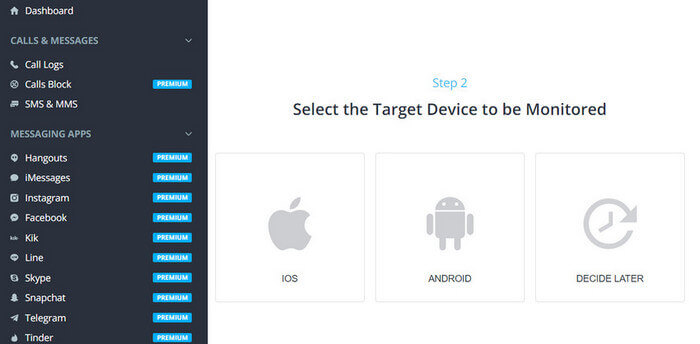
Step 3. Monitor your kid’s WhatsApp conversations
You can log in to your mSpy account and monitor your kid’s WhatsApp messages remotely.
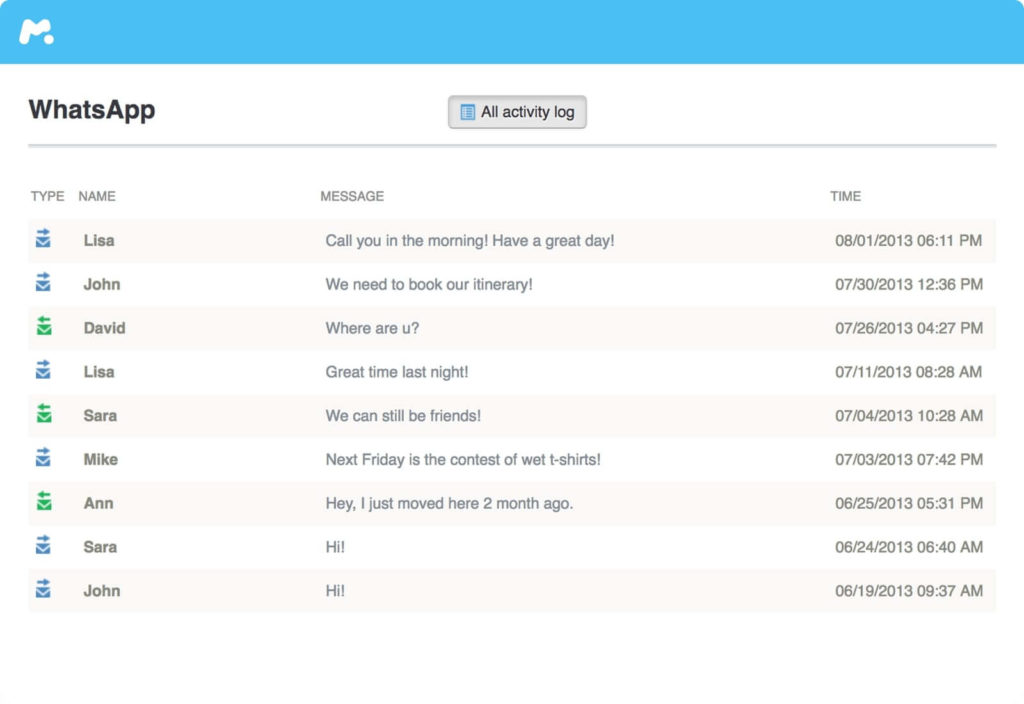
Thus, now you can get on with your daily chores, and mSpy will monitor your kid’s activities incognito. Receive the notifications when they come to your phone and decide what the best approach would be. However, the best is to talk openly with your kids about their social life and not make them feel awkward. Parents can always give the best advice to their kids regarding the various dangers of the Internet. Do not ban the use, but regulate it with the WhatsApp monitors listed above so that your kid can confide their thoughts with you and not meet up with a stranger online.
How useful was this post?
Click on a star to rate it!
Average rating / 5. Vote count: