AirPods by Apple proves to be a breakthrough in the wireless headphone market, and being the best wireless earbuds it continues to be one of the best with an amazing feature add-on at each release. However, sometimes people can face problems like AirPods won’t charge when you connect them with a charger.
If your AirPods are not charging after multiple tries, then here are some things you can try to do. Basically, the charging stuff is related to the AirPods case, due to the fact that it has all the chips packed inside — and the charging case can give your AirPods multiple charges when it is fully charged.
This page is ordered the way a technician would actually work: cheapest and most likely first. Run the quick diagnosis to work out whether you are dealing with the earbuds or the case, then follow the twelve fixes in order. Most people never get past fix three, and none of them need tools beyond a toothbrush. One expectation to set before you start: Apple’s own baseline is to leave AirPods and the case on charge for at least 15 minutes before drawing any conclusion — 5 minutes for AirPods Max. A case that has been flat in a drawer for months often looks dead and then recovers.
Quick Diagnosis: AirPods or Case?
| What you see | Most likely cause | Jump to |
|---|---|---|
| Both AirPods die within minutes, case holds charge | Contacts not touching, or charge limit | Fix 3, Fix 5 |
| One AirPod charges, the other never does | Dirty contact on that earbud or that well | Fix 3 |
| Case light never comes on at all | Cable, adapter, or dead case battery | Fix 2, Fix 11 |
| Case charges, AirPods still at 0% | Debris on the earbud contacts | Fix 3 |
| Charging stops around 80% | Optimized Charge Limit / Optimized Battery Charging | Fix 5 |
| Works at home, fails in the car or outdoors | Temperature outside 0–35°C | Fix 7 |
| Case charges wirelessly but not by cable (or reverse) | Port or coil fault | Fix 6, Fix 12 |
AirPods Won’t Charge: How to Fix the Issue Yourself
The AirPods not charging issue is most commonly related to the charging points. It is normally, due to the carbon or debris collected around the charging points. This carbon prevents the proper connection and passage of electricity through the charging points.
Troubleshooting the AirPods Won’t Charge Issue
Before you take anything apart, inspect these three things in order:
- Inspecting USB Cable & its points
- Checking the charging port of the AirPods case
- Inspecting AirPods Contact Points within the case
Before you continue to troubleshoot the AirPods not charging issue, inspect the status light on the charging case. When your AirPods are in the case, the status light should be green to show the full charging status.
While on the other side the amber light is visible even after 12-hours of charging. It simply means that there is some issue with your AirPods charging.
What the status light actually means in 2026
| Light | Meaning | What to do |
|---|---|---|
| Green (AirPods in the case) | Case is fully charged | Nothing — the case is fine |
| Green (case empty) | Case battery has charge | Insert the AirPods and close the lid |
| Amber | Charging in progress | Wait at least 15 minutes |
| Amber after several hours | Charge is not completing | Work through the fixes below |
| Flashing white | Pairing mode | Re-pair with your device |
| Flashing amber | Pairing failed, needs setting up again | Go to Fix 8 |
| No light at all | No power reaching the case | Go to Fix 2 |
Fix 1: Give the Case a Real 15 Minutes
However, when the AirPods charge is finished, then you can simply put back them in the charging case just for 15 minutes. After that, you will get one hour of talk time and three hours of listening time.
Plug the case in with the AirPods inside, close the lid, and walk away for a quarter of an hour before you judge the result. This is not a placebo — a deeply discharged lithium cell accepts current slowly at first, and the case needs a minimum charge before it will pass anything on to the earbuds.
A correction to the original version of this article
An earlier edition stated that “the AirPods battery is 93mW and it can give you a talk time of 2-hours and a listening time of five hours when it is fully charged.” Two things are wrong with that sentence. First, mW is a unit of power, not capacity — Apple has never published an mAh rating for AirPods. Second, the figure came from the first-generation AirPods. Current models deliver roughly 4 to 6 hours of listening per charge, plus multiple top-ups from the case. Treat any mW capacity figure you read online as unreliable.
Fix 2: Checking the Charging Cable
- Carefully inspect the charging cable for any damage. Look at the charging points carefully, if you are not sure then simply use another cable.
- Similarly, to charge the AirPods, connect the cable with your Mac or Laptop and wait for the green status light.
- You can also borrow a charger from a friend, as this will help to troubleshoot any issue with your charger. Also, make sure that you are properly placing the AirPods within the charging case.
- As they are not able to get in touch with charging points, then they will never charge.
Which port does your case have?
AirPods 4, AirPods 4 (ANC), AirPods Pro 2 (USB-C) and AirPods Pro 3 charge over USB-C; every earlier case uses Lightning. Using the wrong cable is more common than people admit, especially in households that still have both lying around.
Fix 3: Cleaning the AirPods Case Ports and Contacts
When you are not cleaning your charging case regularly, this can be a reason for AirPods won’t charge. The dust and debris collection at charging points with time is a common problem.
- Use a soft-bristled toothbrush, and start cleaning the charging port with it.
- Now, next, you have to clean the internal contact points within the AirPods case. You can use the interdental brush for that if that is not available you can use a soft cloth with a tweezer.
- You can also use 70% isopropyl alcohol with the fiber cloth to clean the charging case. Just make sure that you don’t use too much liquid with a cloth and make it drip within the circuit.
- You just need a little moist cloth dipped in isopropyl alcohol.
Similarly, also clean the charging points on both AirPods. You can use both toothbrushes or microfiber cloth. But be sure that you don’t leave any fiber from cloth inside the connecting points.
One warning worth adding
Never use anything metal inside the case — a pin, a paperclip, a SIM tool. The contacts are plated, and a scratch turns a two-minute fix into a permanently dead slot. Compressed air is a reasonable alternative if you have it, but hold the can upright and use short bursts.
Fix 4: Checking the Charging Status on iPhone, iPad or Mac
Checking Charging Status on iPhone / iPad
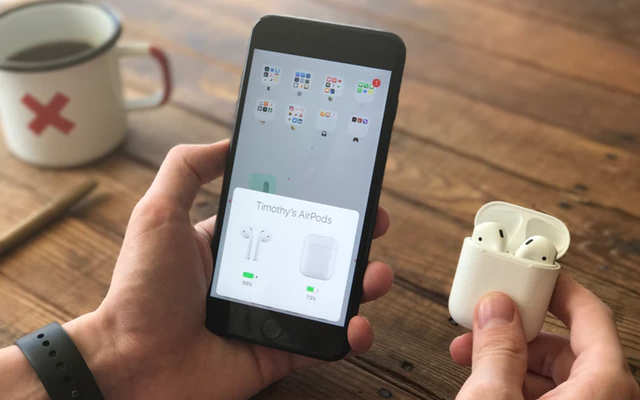
- When you open the lid of the case and place your iPhone or iPad near it.
- Then within a few seconds, you will be able to see the charging status after AirPods connect to your iPhone or iPad.
- If the charging status is not visible then it simply means AirPods are not charging.
Also check on a Mac
Click the Bluetooth icon in the menu bar, or open Control Center, and hover over your AirPods to see the percentage. On iPhone or iPad you can also add the Batteries widget, which keeps the case level visible on the home screen.
Fix 5: Turn Off Optimized Charge Limit (AirPods Pro 3)
The most common false alarm in 2026. AirPods Pro 3 enable Optimized Charge Limit by default once you set them up with, or update to, iOS or iPadOS 26 or later. The AirPods learn your routine and deliberately hold the charge at a reduced limit to slow battery ageing, so they stop well short of 100% and look like they are refusing to charge.
- Wear your AirPods and make sure they are connected to your iPhone or iPad.
- Open Settings, tap the name of your AirPods, then tap Battery.
- Turn off Optimized Charge Limit — or turn it off for just one day if you only need a full charge before a flight.
Earlier models have a related feature called Optimized Battery Charging in the same menu, which pauses the charge around 80%. Same fix.
Fix 6: Reposition the Case on the Wireless Charger
With a Wireless Charging Case on a Qi or MagSafe pad, place the case with the status light facing up. The light turns on for a few seconds and then goes out while charging continues — a light that never appears means the coil is not aligned, so slide the case around a centimetre at a time. Thick cases and metal ring holders block wireless charging entirely; remove them, or just plug the cable in.
Fix 7: Check the Temperature
AirPods are designed to operate between 0°C and 35°C (32°F to 95°F). Outside that window charging slows or stops completely. A case left on a dashboard, on a windowsill or next to a heater will usually charge again once it has returned to room temperature — give it half an hour indoors before you conclude the battery is dead.
Fix 8: Reset Your AirPods
If you are still having charge issues on AirPods after you tried all the above steps. Now it’s time to reset your AirPods.
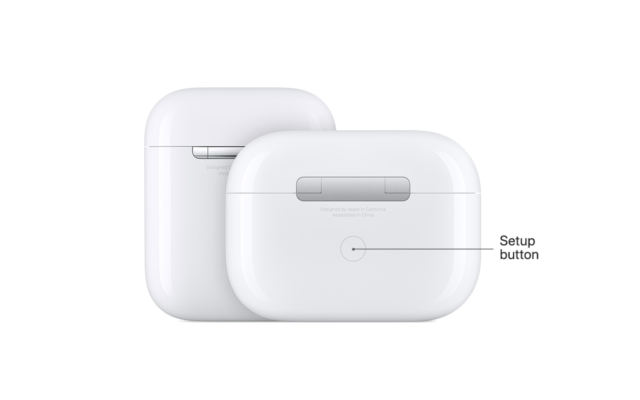
- You just need to press and hold the button available on the back of the charging case. This will reset your AirPods.
The full sequence, which matters more than people expect:
- Put both AirPods in the case and close the lid for about 30 seconds.
- Open the lid, then press and hold the setup button on the back of the case for around 15 seconds.
- Release when the status light flashes amber and then white.
On AirPods Max, hold the noise-control button and the Digital Crown together for 15 seconds until the LED flashes amber then white.
Fix 9: Forget and Re-Pair
On iPhone or iPad go to Settings, tap Bluetooth, tap the info button next to your AirPods and choose Forget This Device. Confirm, then re-pair by opening the case lid next to the device. This clears a corrupted Bluetooth profile that can freeze the reported battery percentage at a stale value.
Fix 10: Update iOS and the AirPods Firmware
AirPods firmware updates automatically while they are charging and within Bluetooth range of the paired iPhone, iPad or Mac that is online. There is no manual update button. If your AirPods have not been charging, they have probably not been updating either — leave them in the case, connected to power and near your phone for an hour, then check the firmware version under Settings, tap the name of your AirPods.
Fix 11: Check Whether the Battery Is Worn Out
AirPods use small lithium-ion cells that lose meaningful capacity after roughly two to three years of daily charging. The useful test is asymmetry: if one earbud dies much faster than the other, or the case cannot hold a charge through a day, the cell is worn and no amount of cleaning will help.
Based on Apple’s published US service estimates, a single replacement AirPod runs about $69–$89, the charging case about $59–$89, and battery service about $49–$79 depending on model. Prices vary by country, so check Apple’s repair page for your region.
Fix 12: Contact Apple Support and Check Your Warranty
If your AirPods are still not charging, then you may need to contact Apple Support to claim the warranty or to request a replacement. We also have covered some details on AirPods replacement including the pricing and other details. The replacement cost can be capped at $29 when you buy an Apple Care+ plan with your AirPods.
To be precise about what that means in 2026: AppleCare+ for headphones replaces the per-component prices with a flat $29 accidental-damage fee per incident, and covers battery service at no charge once capacity falls below 80%. It does not cover loss — a lost AirPod or case is charged at the full replacement price. If your AirPods are under a year old, the fault is very likely covered by the limited warranty, and Apple replaces the failed component rather than repairing it, so you do not have to buy a whole new set.
How to Stop This Happening Again
- Wipe the contacts and the inside of the case every few weeks with a dry cloth.
- Keep the case out of direct sun, hot cars and heater vents.
- Do not store the case completely flat for months; top it up occasionally.
- Leave Optimized Charge Limit or Optimized Battery Charging switched on unless you genuinely need 100%.
Frequently Asked Questions
1. Why does only one AirPod charge?
Dirty contacts, nearly always. Swap the earbuds between the left and right wells: if the problem moves with the earbud, clean the earbud; if it stays in the same well, clean the case.
2. My AirPods case light is amber and never turns green. Is the battery dead?
Not necessarily. Leave it on a cable you know works for a full hour. If it is still amber, the adapter, the temperature or the contacts are the likely cause — see Fix 2, Fix 3 and Fix 7.
3. Can I charge AirPods with a fast charger or a phone charger?
Yes. AirPods draw only a small amount of power, so wattage is irrelevant. The cable and the contacts matter far more.
4. Do AirPods charge when the case lid is open?
They do, but charging is more reliable with the lid closed, and the status light is only meaningful once the lid is shut while on a cable.
5. How long should AirPods take to charge?
About 15 minutes in the case gives roughly one hour of talk time or around three hours of listening. A full case charge takes about an hour on a cable, longer on a wireless pad.
6. Will resetting AirPods delete anything?
A reset clears the pairing, the name and custom controls such as double-tap actions. Nothing on your iPhone is affected, and re-pairing takes a few seconds.
7. Is it safe to clean the case with alcohol?
Yes, in small amounts — 70% isopropyl on a lint-free cloth, barely damp. Never spray or pour liquid into the case.
8. Are AirPods batteries user-replaceable?
No. Apple services the unit and replaces the component. Third-party DIY kits exist but the earbuds are glued shut and attempts usually destroy them.
Záver
Most “AirPods won’t charge” reports come down to three things, and you can check all three in under ten minutes: a cable or adapter that has failed, debris on the charging contacts, or a charge-management feature that is doing its job a little too well. Start with the cable, because it is the easiest thing to swap. Then clean the contacts on both the earbuds and inside the case — that is the fix that actually resolves the majority of cases, and it costs nothing. Only after that should you move on to a reset, and only if a reset fails should you start thinking about the battery or Apple service.
If you own AirPods Pro 3, check Optimized Charge Limit early, because the behaviour looks exactly like a charging fault and there is nothing wrong with your hardware. And if your AirPods are more than three years old, with one side draining noticeably faster than the other, you are probably looking at normal battery wear rather than a defect — Apple’s battery service is usually far cheaper than a new set.
Whichever route you take, keep the habit of wiping the contacts every few weeks and keeping the case away from heat. It is a two-minute job that prevents most of this page from ever being relevant to you again.
Aký užitočný bol tento príspevok?
Kliknite na hviezdičku a ohodnoťte to!
Priemerné hodnotenie / 5. Počet hlasov: