"Nista' nwaqqaf lill-ġenituri tiegħi milli jsegwu l-lokazzjoni tiegħi permezz ta' Life360 mingħajr ma jkunu jafu? Ma nistax nibqa' nissaporti aktar." – From Reddit
Are you in the same situation as the teenager above? Are you angry when you realize that your location is always tracked by your parents? Are you searching for a way to turn off the location on Life360 without anyone knowing? This article gives you 6 solutions to turn off location tracking on Life360.
What Is Life 360?
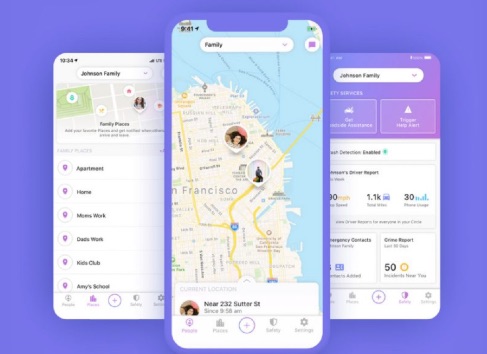
Life360 is a GPS tracking service for small circles (families, teams, etc.). Users can choose to share their location with other users in a small circle and receive alerts when others in the circle arrive at important locations. This service is very practical and emphasizes security. Users can send emergency alerts to everyone in their circle and get directions to family members’ locations.
As said previously, it is not comfortable to be tracked by your parents or team members for security reasons. If you hate that your location is monitored and you would like to go shopping with your boyfriend, your urgent need may be to turn off location on Life360 without anyone knowing.
How to Turn Off Location on Life360 without Anyone Knowing (2025)
We have shared the best ways to turn off your location on Life360 without anyone knowing.
Iddiżattiva l-Lokazzjoni ta' Circle fuq Life360
Għandek id-dritt li tiddiżattiva l-karatteristika li taqsam id-dettalji tal-lokazzjoni tiegħek ma' utenti f'ċirku speċifiku jew tagħżel li tiskonnettja minn ċirku.
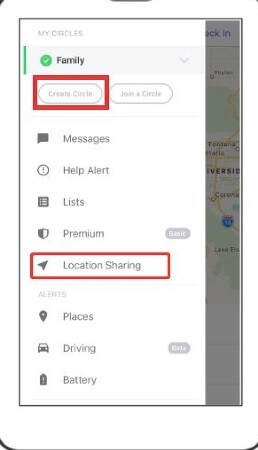
- Open the Life360 app and tap on Settings in the right corner.
- Select a circle that you wish to stop tracking your location on the interface.
- Ikklikkja fuq l-għażla ta' "Kondiviżjoni tal-Lokazzjoni" u agħfas is-slajder biex titfi l-karatteristika.
- Check on the map, and “Location Sharing Paused” will appear on the screen.
Nota:
- When “Location Sharing Paused” appears on the screen, every member in the circle will be notified.
- If you need to turn on the “Location Sharing” feature, you can tap on the “Help Alert” button.
- The location will be updated in the circle regardless of whether “Location Sharing” is turned on or not when you click on the “Check-In” button.
Turn on Airplane Mode
Mod ieħor kif twaqqaf lil Life360 milli jaqsam il-lokazzjoni tiegħek huwa li tixgħel il-Modalità Ajruplan fuq it-tagħmir tiegħek.
After turning off the Airplane Mode, the device’s internet connection will be inaccessible, thus the device will be disconnected from the GPS location.

Itfi s-Servizz tal-GPS fuq l-Apparat Tiegħek
Disabling the GPS service could also be a feasible option to pause the GPS connection.
For iPhone:
- Ikklikkja fuq Settings fuq l-iPhone tiegħek.
- Tap on “Personal” to open “Location Services”, then turn off this service.

For Android:
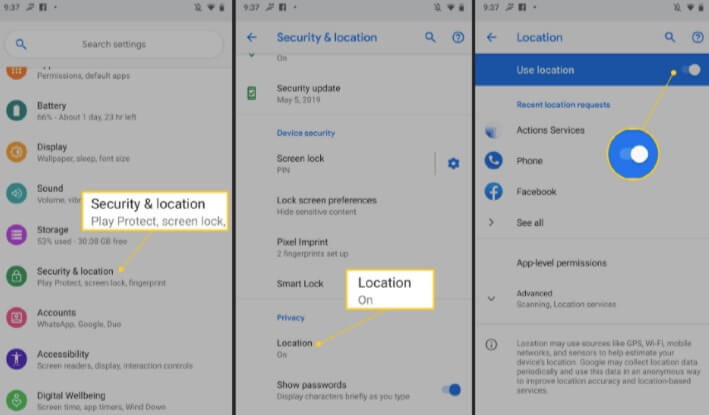
- Open the Settings app on your Android phone and scroll down to select “Privacy”.
- Turn off “Location” to stop location tracking for apps.
Telefon tal-Ħruq
It is quite simple to turn off the location on Life360 via Burner Phone. Burner phones can be disposed of at any time, and they keep your identity anonymous.
- Download Life360 on the burner phone and sign in with the same account.
- Connect the phone to the available WiFi.
- Uninstall this app from your own device, and your parents will no longer track your phone.
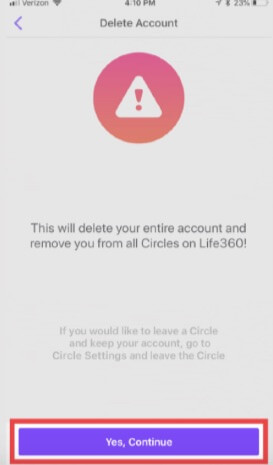
Delete Life360 Account
Most of us think that the simplest way to stop Life360 location tracking is to uninstall this app. But is it really reliable to protect our location privacy?
Actually, your location will still be displayed in the final location even if you delete this application. To permanently erase the location history, you need to delete the Life360 account from the home settings.
Biex tħassar dak il-kont, l-ewwel għandek tikkanċella l-abbonament. Wara li tikkanċella l-abbonament, il-lokazzjoni tiegħek dalwaqt tisparixxi minn dak iċ-ċirku.
Flexible Way to Turn Off Life360 without Anyone Knowing: Fake Location
Ponta oħra flessibbli u konvenjenti biex taħbi l-post attwali tiegħek hija li tipprojbixxi post falz.
One Click to Change The GPS Location on iPhone & Android (Best Way)
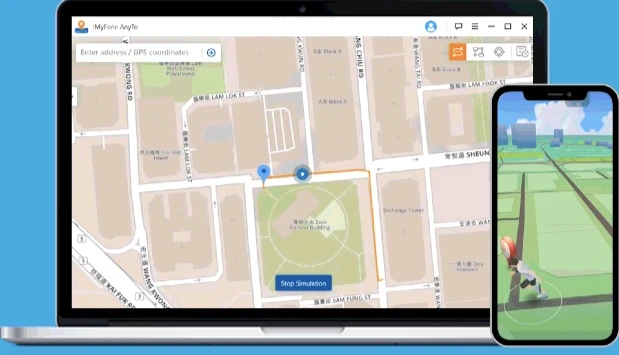
Naf softwer li jqarraq il-lokazzjoni jismu Bidla tal-Lokazzjoni . This software can easily spoof your location on your iPhone, iPad, and Android. Once you set a fake location, every member in the circle will no longer track your current location. It sounds amazing, right? Here you can have a try.
Pass 1. Download Location Changer and install it on your computer, then launch it. Select “Get Started”.

Step 2. Unlock your device first and connect it to the computer.
Step 3. When the connection is established, select one fake location on the map and click on “Start to Modify”.

Your real location will be changed immediately.
Use An App to Change Your Location on Android
One of the most recommended apps to set fake locations is called Fake GPS Go Location Spoofer . Now, follow the steps below to stop Life360 from tracking:
- Search and install Fake GPS Go Location Spoofer from the Play Store and turn on the “Developer Options” from your device settings.
- Issettja din l-app bħala app ta' lokazzjoni finta.
- Launch this app and choose a fake location.
- Click on the “Play” button to proceed.

Dangers You Should Know After Turning Off Location on Life360
It is an important issue to protect our privacy when it comes to Life360, since these tracking apps will reveal our privacy. However, there are possible dangers you should be aware of when you choose to turn off location tracking on Life360.
Lack of Supervision
Parents cannot supervise what kids are doing or where they are when kids hide or fake their locations. This will entail a huge risk of being kidnapped or inappropriate activities.
Sneak Out
Most teenagers like to slink away in the evening and get together with their friends. They are a very serious risk if they stop Life360 location tracking. Parents cannot know where their kids are when they meet criminals and dangerous people.
Kemm kien utli dan il-post?
Ikklikkja fuq stilla biex tikklassifikaha!
Klassifikazzjoni medja / 5. Għadd tal-voti: