Кээде сизге Facebook видеолорун жүктөп алуу керек болушу мүмкүн, бирок биз Facebook видеолорду түз жүктөп алууга мүмкүндүк берүүчү жүктөө баскычын сунуштабай турганын билебиз. Ошентип, Facebook видеолорун кантип оңой жүктөп алсак болот?
Facebookтан видео жүктөп алуу үчүн Facebook видео жүктөөчүсүн орнотушуңуз керек. Бул жерде биз сизге сунуштайбыз Онлайн видео жүктөөчү сизге. Бул Facebook же YouTube сыяктуу башка веб-сайттардан видеолорду алууга жардам берүүчү эң сонун компьютердик видео жүктөөчү. Ошондой эле, бул программа менен Facebook видеолорун кантип жүктөп алууну төмөндө үйрөнөсүз.
Эмне үчүн онлайн видео жүктөөчүсүн тандашыңыз керек?
Онлайн видео жүктөөчү Facebook, Instagram, YouTube, Vimeo, Twitter ж.б. сыяктуу көпчүлүк белгилүү видео бөлүшүү веб-сайттарынан видеолорду жүктөп алууга жардам берет, ал тургай кээ бир видеолордун аудиосун да жүктөп алсаңыз болот. Так колдонуучу интерфейси программанын иштешин оңой кармап турууга мүмкүндүк берет. Өркүндөтүлгөн жүктөө технологиясына жараша, сиз видеолорду тез жүктөө ылдамдыгы менен жүктөп гана тим болбостон, бир нече видео чечилиште жүктөп алууга да уруксат берилет. Андан тышкары, сиз көп күтүү убактысын үнөмдөө үчүн топтомдук жүктөө үчүн көбүрөөк видеолорду кошо аласыз.
Акысыз жүктөп алуу Акысыз жүктөп алуу
Андан кийин, биз сизге Facebook видеолорун жүктөп алып, аларды компьютериңизге сактоого жардам бере турган жөнөкөй көрсөтмө беребиз.
Facebookтан видеолорду акысыз жүктөп алуу боюнча этап-этабы менен көрсөтмө
1-кадам. Онлайн видео жүктөөчүсүн ачыңыз
Эгер сиз жүктөп албаган болсоңуз Онлайн видео жүктөөчү , программаны төмөнкү баскычты чыкылдатып, компьютериңизге орнотуу менен жүктөп алсаңыз болот. Ал иштей турганына ынануу үчүн, аны ачып, даярданыңыз.
Акысыз жүктөп алуу Акысыз жүктөп алуу
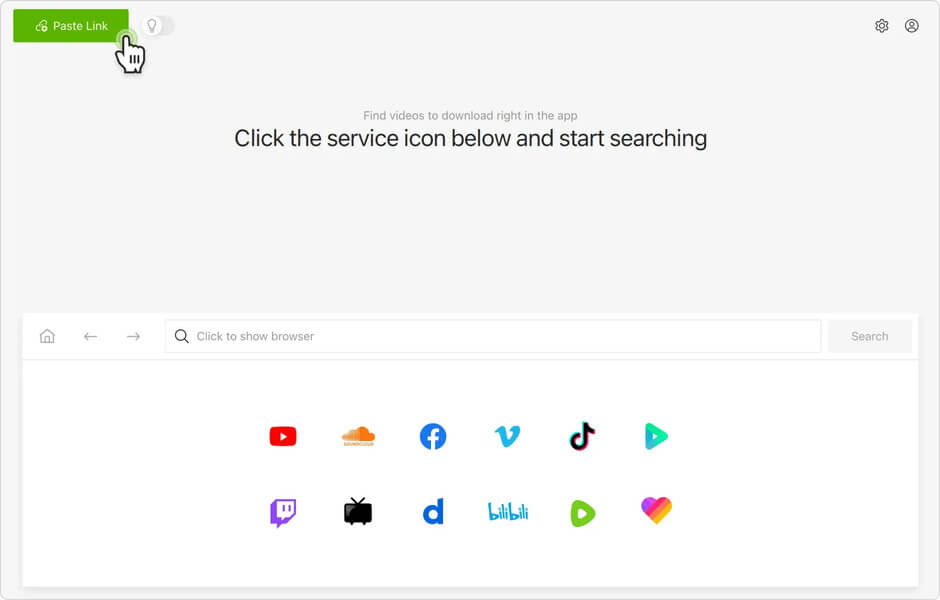
2-кадам. Facebook видео баракчасына өтүңүз
Facebook аккаунтуңузга кирип, жүктөп алгыңыз келген видео постко өтүңүз. Андан кийин видеону ойнотуңуз, бул учурда видео экранын оң баскыч менен чыкылдатыңыз. Тандоо терезелери пайда болот, сиз "Видеонун URL дарегин көрсөтүү" опциясын тандашыңыз керек. Андан кийин, видео шилтемесин көрсөткөн кичинекей терезени көрө аласыз. Шилтемени толугу менен тандап, "Видеонун URL дарегин көчүрүү" үчүн оң баскыч менен чыкылдатыңыз.
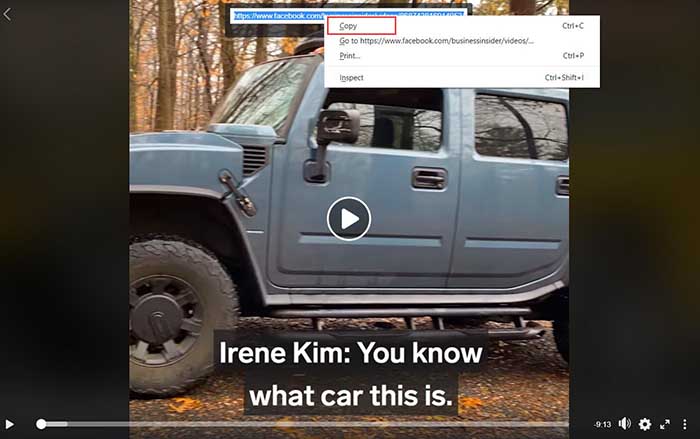
3-кадам. Facebook видеосун алыңыз
Онлайн видео жүктөөчүнүн негизги интерфейсине өтүп, видеонун URL дарегин "Талдоо" киргизүү кутучасына чаптаңыз. Андан кийин Facebookтан видеону алуу үчүн "Талдоо" баскычын чыкылдатыңыз.
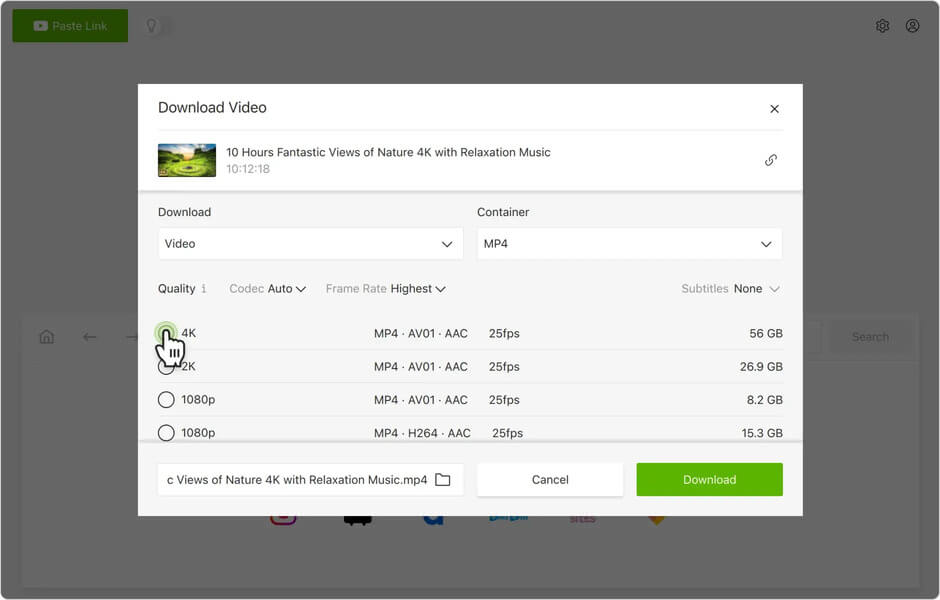
4-кадам. Чыгаруунун форматын тандап, жүктөп алыңыз
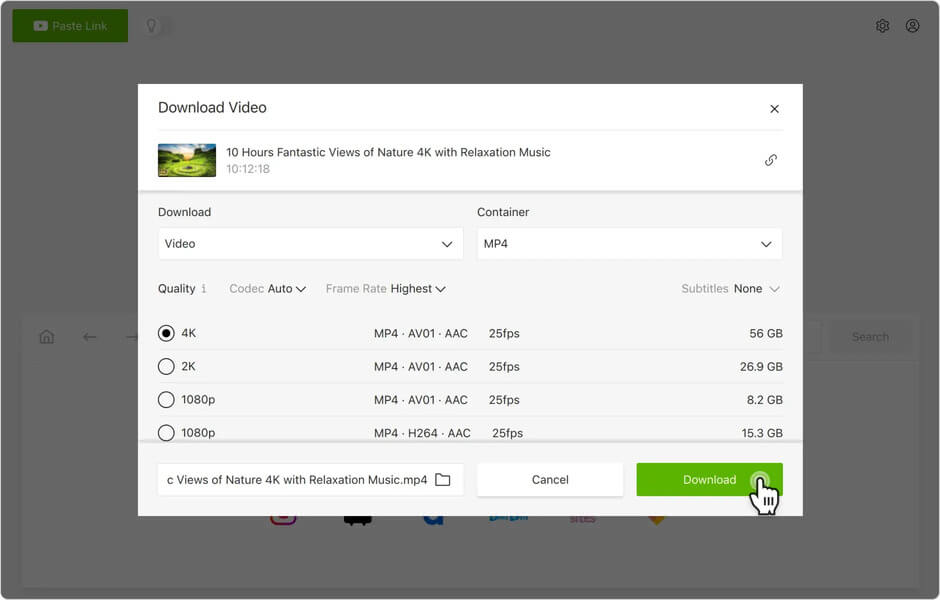
Бир аз күтө туруңуз, ал сизге чыгаруу форматын тандоо үчүн тизме берет. Мисалы, MP4, MP3 жана M4A. Айрым URL'дер видеолорду жана аудиолорду же жөн гана видеолорду жүктөп алууга мүмкүндүк берет. Эми сиз бир форматты тандап, видеону жүктөп алуу үчүн "Жүктөө" баскычын чыкылдатыңыз. Ал ишке ашканда, видеону компьютериңизден көрө аласыз.
Жыйынтык
Болгону бир нече чыкылдатуу менен сиз Facebook видеолорун тез жүктөп алып, аларды компьютериңизге сактай аласыз. Онлайн видео жүктөөчү , сиз веб-сайттардан 8K, 4K, 1080P, 720P жана башка чечилиштеги видеолорду эч кандай кыйынчылыксыз жүктөп алсаңыз болот. Аны көпчүлүк адамдар үчүн колдонуу оңой жана мен аны онлайн видеолорду компьютерге жүктөп алуу үчүн идеалдуу жумушчу стол жүктөөчүсү деп айтышым керек. Андан тышкары, ал жаңы колдонуучуларга 15 күндүн ичинде онлайн видеолорду бекер жүктөп алуу үчүн сыноо версиясын сунуштайт. Аны азыр жүктөп алыңыз жана дагы сонун функцияларды пайдаланыңыз.
Акысыз жүктөп алуу Акысыз жүктөп алуу
Бул пост канчалык пайдалуу болду?
Баалоо үчүн жылдызчаны басыңыз!
Орточо баа / 5. Добуштардын саны: