Carinan dibe ku hûn hewce bikin ku vîdyoyên Facebookê dakêşin, lê em dizanin ku Facebook bişkojka dakêşanê pêşkêş nake da ku hûn rasterast vîdyoyan dakêşin. Ji ber vê yekê em çawa dikarin vîdyoyên Facebookê bi hêsanî dakêşin?
Ji bo dakêşana vîdyoyek ji Facebookê divê hûn dakêşkerek vîdyoyên Facebookê bistînin. Li vir, em dixwazin pêşniyar bikin Dakêşana Vîdyoyê ya Serhêl ji we re. Ew dakêşkerek vîdyoyê ya sermaseyê ya ecêb e ku ji we re dibe alîkar ku hûn vîdyoyan ji Facebookê an malperên din ên mîna YouTube-ê bigirin. Her weha, hûn ê di jêrîn de fêr bibin ka meriv çawa vîdyoyên Facebookê bi vê bernameyê dakêşin.
Çima Dakêşana Vîdyoya Serhêl Hilbijêrin?
Dakêşana Vîdyoyê ya Serhêl Piştgiriya we dike ku hûn vîdyoyan ji piraniya malperên parvekirina vîdyoyan ên navdar, di nav de Facebook, Instagram, YouTube, Vimeo, Twitter û hwd. dakêşin, hûn dikarin dengê hin vîdyoyan jî dakêşin. Navrûya bikarhêner a zelal dihêle hûn bi hêsanî xebitandina bernameyê bigirin. Li gorî teknolojiya dakêşanê ya pêşkeftî, hûn ne tenê dikarin vîdyoyan bi leza dakêşanê ya bilez dakêşin, lê di heman demê de hûn dikarin gelek çareseriyên vîdyoyan dakêşin. Wekî din, hûn dikarin vîdyoyan li dakêşana komî zêde bikin da ku hûn gelek demên li bendê xilas bikin.
Piştre, em ê rêbernameyek hêsan bidin we da ku ji we re bibe alîkar ku hûn vîdyoyên Facebookê dakêşin û wan li ser komputera xwe hilînin.
Rêbernameya Gav-Bi-Gav ji bo Dakêşandina Vîdeoyan ji Facebookê Belaş
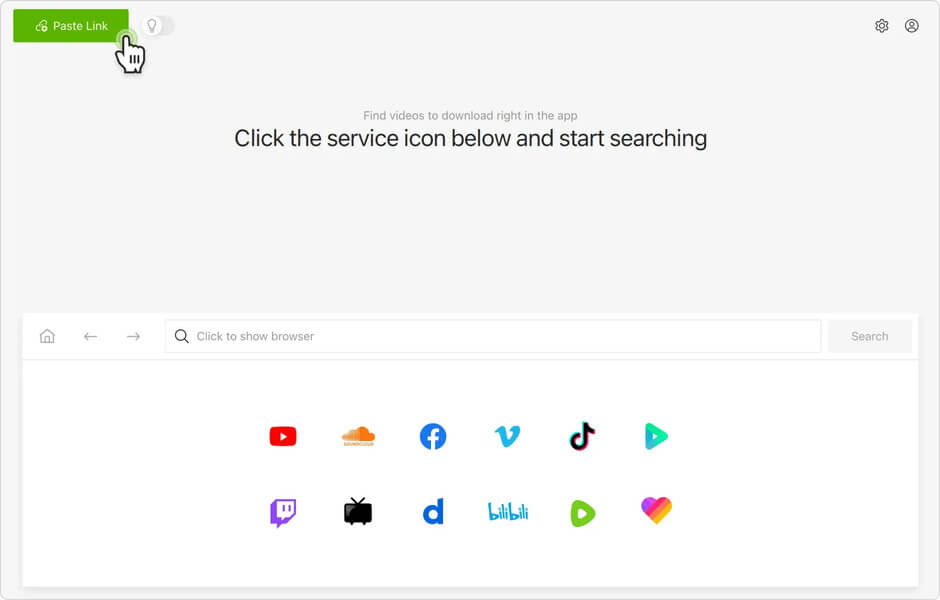
Gav 1. Dakêşana Vîdyoya Serhêl Vekin
Eger te dakêşandibe Dakêşana Vîdyoyê ya Serhêl , hûn dikarin bernameyê bi tikandina bişkoka jêrîn dakêşin û li ser komputerê xwe saz bikin. Ji bo ku hûn pê ewle bin ku ew dikare bixebite, tenê wê vekin û amade bikin.
Gav 2. Biçe Rûpela Vîdyoyê ya Facebookê
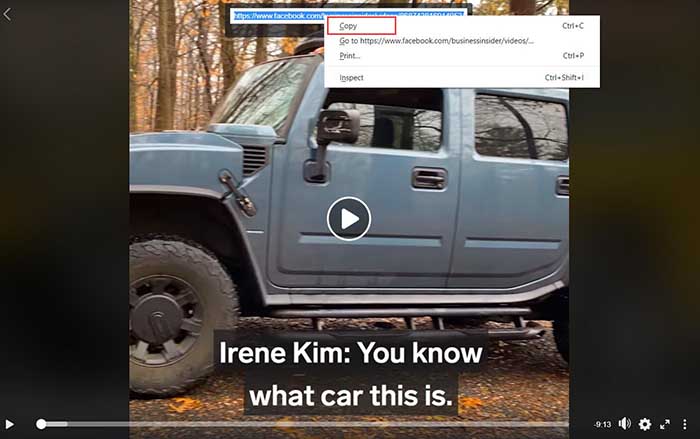
Têkeve hesabê xwe yê Facebookê û biçe ser vîdyoya ku dixwazî dakêşînî. Dûv re vîdyoyê bilîze, di vê gavê de, divê hûn bi mişkê rastê li ser dîmendera vîdyoyê bikirtînin. Hilbijartin dê derkevin holê, divê hûn vebijarka "URL-ya vîdyoyê nîşan bide" hilbijêrin. Piştî vê yekê, hûn dikarin pencereyek piçûk bibînin ku girêdana vîdyoyê nîşan dide. Tevahiya girêdanê hilbijêrin û bi mişkê rastê bikirtînin da ku URL-ya vîdyoyê "Kopî bike" hilbijêrin.
Gav 3. Vîdyoya Facebookê bigirin
Biçe navrûya sereke ya Dakêşana Vîdyoya Serhêl û URL-ya vîdyoyê li qutiya têketinê ya "Analîze bike" bicîh bike. Dûv re bişkoja "Analîze bike" bikirtîne da ku vîdyoyê ji Facebookê bigire.
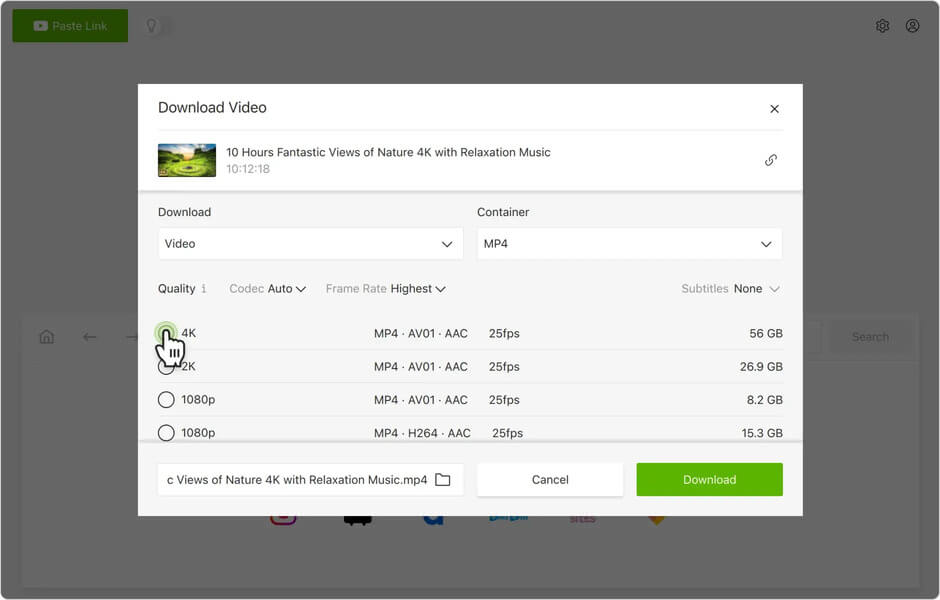
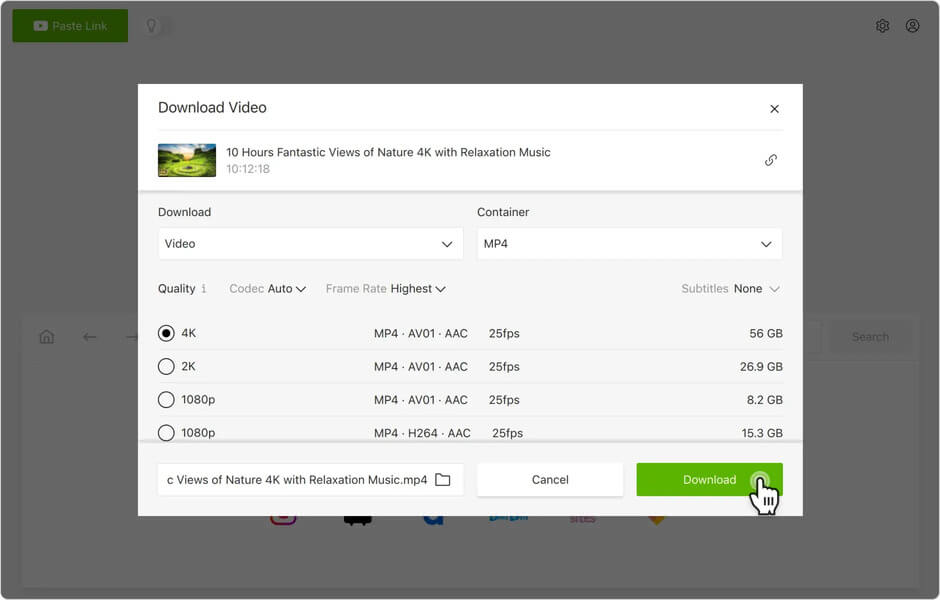
Gav 4. Formata Derketinê û Dakêşandinê Hilbijêre
Demekê li bendê bin, ew ê lîsteyekê ji we re peyda bike ku hûn formata derketinê hilbijêrin. Wekî MP4, MP3, û M4A. Hin URL dihêle hûn vîdyo û deng, an tenê vîdyoyan dakêşin. Naha hûn dikarin formatekê hilbijêrin û bişkoja "Daxistin" bikirtînin da ku vîdyoyê dakêşin. Dema ku ew çêdibe, hûn dikarin vîdyoyê li ser komputerê xwe temaşe bikin.
Xelasî
Tenê bi çend klîkan, hûn dikarin vîdyoyên Facebookê zû dakêşin û wan li ser komputerê xwe tomar bikin. Dakêşana Vîdyoyê ya Serhêl , hûn dikarin vîdyoyên bi çareseriyên 8K, 4K, 1080P, 720P, û çareseriyên din ji malperan bêyî zehmetî dakêşin. Bikaranîna wê ji bo piraniya mirovan hêsan e û divê ez bibêjim ku ew dakêşkerek sermaseyê ya îdeal e ku vîdyoyên serhêl dakêşîne ser PC-yê. Wekî din, ew guhertoyek ceribandinê ji bo bikarhênerên nû peyda dike da ku vîdyoyên serhêl di nav 15 rojan de belaş dakêşin. Naha bistînin û taybetmendiyên bêtir ecêb biceribînin.
Ev post çiqas kêrhatî bû?
Ji bo nirxandinê li ser stêrkekê bikirtînin!
Nirxandina navînî / 5. Jimara dengan: