“Help! I accidentally deleted a note on my MacBook and I can’t find it on iCloud. What can I do to find it back?”
“I upgrade my MacBook system to macOS High Sierra, but all the notes stored locally are lost. I don’t know what’s going on and how to get them back.”
Above are some complaints about deleted/lost notes on Mac. It’s quite common to delete a note by mistake and lose some files during the upgrade. Luckily, the deleted or lost notes are still lying in your Mac but you just can’t find them in a normal way, so it’s of high possibility to recover notes on Mac. If you are experiencing the same problem, follow the steps to easily recover notes on Mac!
How to Recover Deleted Notes on Mac
As we have mentioned before, the deleted notes are still in your Mac. So, you just need a tool to help you find the notes and recover them to where they usually should be seen.
데이터 복구 is a highly-recommended tool. It can recover the deleted notes safely and quickly on MacBook and iMac. Unlike some of the other data recovery applications, Data Recovery provides a clear user interface that is user-friendly and easy to use.
By the way, it can also retrieve deleted images, videos, audios, emails, documents, and more. And it works with macOS Ventura, Monterey, Big Sur, Catalina, Mojave, High Sierra, and more.
Download it and recover your notes in only 3 steps!
Step 1: Set up Notes Recovery
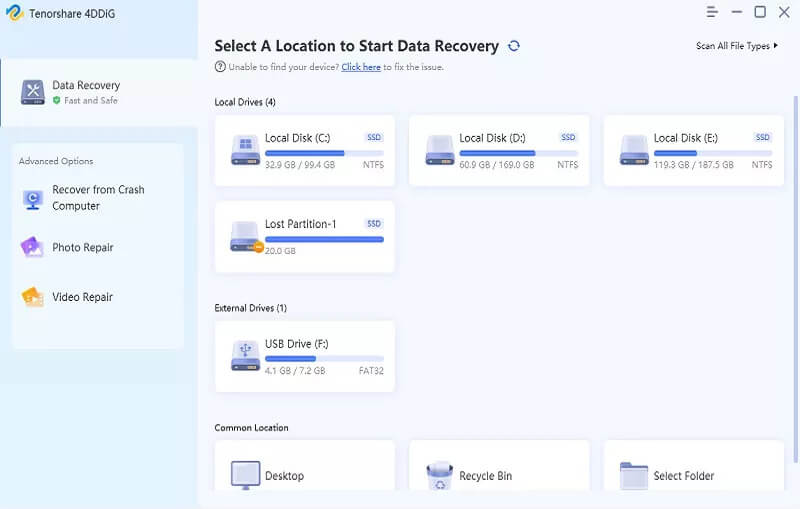
Install Data Recovery and open it. On the homepage, you can select data type and location to scan deleted data. Here we select document. Then click “Scan” to get started.
Step 2: Scan and Recover Notes on Mac
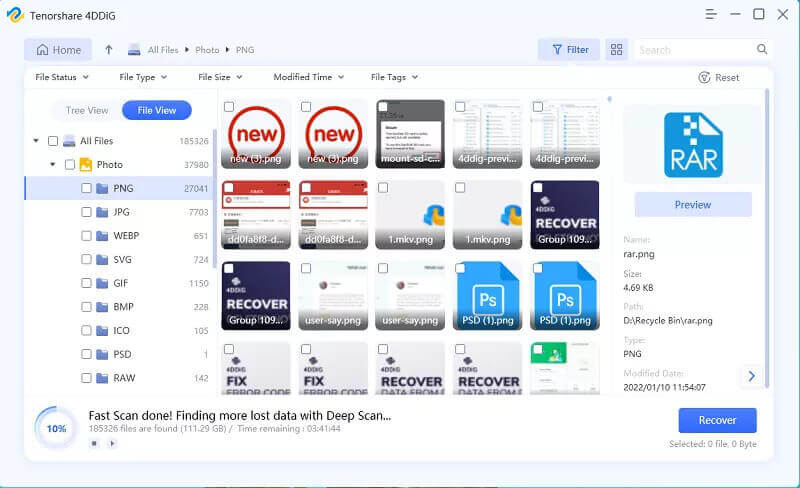
After you click the Scan button, Data Recovery will start a quick scan automatically. When it’s done, check the result via the path list on the left.

Go to “ ~/Library/Containers/com.apple.Notes/Data/Library/Notes/ “. Choose .storedata and .storedata-wal files to recover.
Tips: If you find the result not satisfying, click “Deep Scan” to find more content. It may need some time.
Step 3: View Deleted Notes on Mac
Before you are able to open the deleted notes, there’s something more to do to make them readable.
- Go to the output folder with the recovered .storedata and .storedata-wal files.
- Change the files’ extension to .html. When the question dialog box pops up, click that you want to change the extension.
- Then open the files. They can be easily read by a web browser or an app like TextEdit with HMTL tags.
- Press Cmd + F to find the note text you were looking for and paste them to somewhere else.

Download Data Recovery and have a try!
Notes Disappeared from Mac, How to Recover Lost Notes?
Since you’re here, you might lose your notes due to the system update. There are sometimes when the files get lost during the macOS upgrade, such as the macOS Monterey upgrade, as the question at the beginning of this article. Don’t worry! There are two ways to fix it.
Retrieve Disappeared Notes from .storedata Files
1단계. Open Finder. Click Go > Go to Folder. Enter in this path:
~/Library/Containers/com.apple.Notes/Data/Library/Notes/ .
2단계. Find files named as .storedata or .storedata-wal, which may contain the texts of the lost notes.
3단계. Then open the .storedata and .storedata-wal files following the method introduced in Part 1.

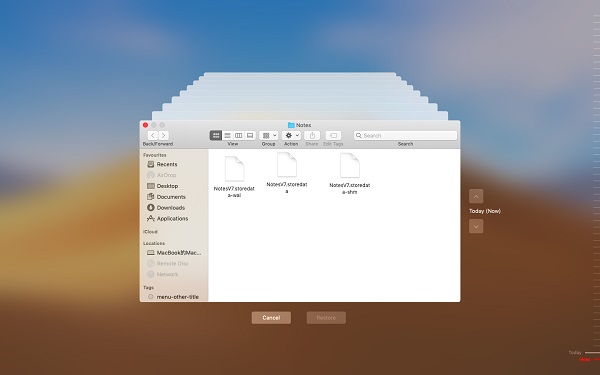
Restore Disappeared Notes from Time Machine
Time Machine is the built-in backup function of Mac. With it, you can find the backup of notes and recover them.
1단계. Open Time Machine in the Dock.
2단계. 가다 ~/Library/Containers/com.apple.Notes/Data/Library/Notes/ . Find a version of the Notes file that are created before the deletion.
3단계. Click Restore to restore the selected file.
4단계. Then exit Time Machine and launch the Notes app on your Mac. The missing notes should reappear.
All the above are the simplest and the most efficient ways to recover deleted/lost notes on Mac. Does this passage help? If so, please give us a like and share it with your friends!
이 게시물은 얼마나 유용했나요?
별을 클릭해서 평가해 주세요!
평균 평점 / 5. 득표수: