
Kev tshawb nrhiav hauv internet ntawm lub cuab yeej Android muab kev nkag mus rau ntau yam kev kawm, kev lom zem, thiab cov kev pabcuam online. Txawm li cas los xij, tsis yog txhua lub vev xaib muaj kev nyab xeeb lossis tsim nyog. Qee lub vev xaib yuav muaj cov ntaub ntawv tsis tseeb, cov ntaub ntawv dag, kev dag ntxias phishing, malware, lossis lwm yam ntsiab lus uas yuav ua rau cov neeg siv - tshwj xeeb tshaj yog cov menyuam yaus - muaj kev pheej hmoo. Rau cov tsev neeg sib koom cov khoom siv lossis rau cov niam txiv tswj hwm tus menyuam lub xov tooj, kev txwv kev nkag mus rau qee lub vev xaib tuaj yeem yog ib feem tseem ceeb ntawm kev nyab xeeb online.
Kev thaiv cov vev xaib tsis yog tsuas yog tiv thaiv kev nkag mus rau cov ntsiab lus tsis tsim nyog xwb. Nws kuj tseem tuaj yeem pab txo qhov cuam tshuam, txhim kho kev ua haujlwm, tiv thaiv cov ntaub ntawv tus kheej, thiab txo qhov kev pom cov vev xaib phem lossis phem. Txawm tias koj yog niam txiv, xib fwb, lossis tus neeg siv, kev teeb tsa kev txwv rau lub vev xaib tso cai rau koj los tsim kev nyab xeeb dua thiab tswj hwm kev tshawb nrhiav ntau dua.
Zoo hmoo, Android muaj ntau txoj hauv kev los thaiv cov vev xaib. Nyob ntawm seb koj xav tau dab tsi, koj tuaj yeem siv cov chaw teeb tsa hauv browser, cov apps tswj hwm niam txiv, cov kev pabcuam lim DNS, lossis txawm tias teeb tsa cov kev txwv los ntawm koj lub router Wi-Fi hauv tsev. Txhua txoj hauv kev muaj ntau qib kev tiv thaiv thiab kev ywj pheej sib txawv.
Hauv phau ntawv qhia no, peb yuav piav qhia txog yuav ua li cas thaiv cov vev xaib hauv Android siv cov txheej txheem zoo tshaj plaws. Los ntawm kev xaiv txoj hauv kev zoo, koj tuaj yeem tiv thaiv koj tsev neeg zoo dua, tiv thaiv koj cov ntaub ntawv tus kheej, thiab tsim kom muaj ib puag ncig online zoo dua rau kev tshawb nrhiav txhua hnub.
Yuav ua li cas thaiv cov vev xaib hauv Android
Kev tswj kev nkag mus rau cov vev xaib, tshwj xeeb tshaj yog ntawm ib lub tshuab tsis tas yuav ua rau koj nkees lossis nyuaj. Koj tuaj yeem teeb tsa ib lub thaiv ntawm theem operating system tau yooj yim. Kev teeb tsa koj lub system yog ib feem tseem ceeb ntawm koj qhov kev ruaj ntseg tag nrho. Koj tuaj yeem tau txais kev ntseeg siab rau kev nyab xeeb ntawm cov vev xaib raug thaiv yog tias koj xav kom tsis txhob nkag mus rau cov chaw tsis raug cai.
Yuav ua li cas thaiv cov vev xaib hauv Android nrog mSpy
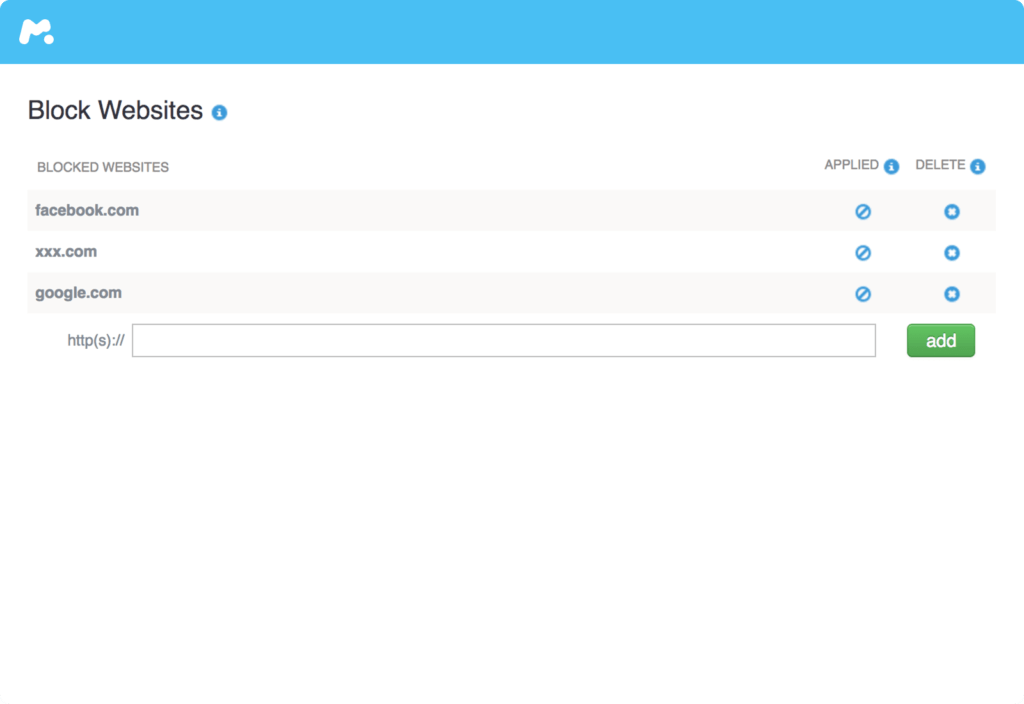
mSpy yog tsim los pab koj tiv thaiv kev nkag mus rau cov vev xaib tsis zoo hauv koj tsev neeg. Nws tso cai rau koj txwv lawv los ntawm cov ntsiab lus tsis tsim nyog, nrog tsawg kawg 18 cov ntaub ntawv hais txog kev ntxub ntxaug lwm haiv neeg, kev siv tshuaj yeeb, kev ua phem, thiab ntau ntxiv. Nws los nrog cov yam ntxwv zoo kawg nkaus los ua kom cov txheej txheem yooj yim. Yog tias koj txhawj xeeb tias koj cov menyuam yuav raug rau cov ntsiab lus tsis tsim nyog, qhov no yog lub cuab yeej zoo tshaj plaws los siv.
Nws pheej yig thiab yooj yim siv. Koj yuav tsum tau yuav mSpy , thiab tom qab ntawd teeb tsa thiab nruab nws ua ntej koj pib taug qab thiab thaiv. Thaum koj them nyiaj, koj yuav tau txais email txais tos los coj koj mus rau qhov pib siv. Koj tuaj yeem rub tawm thiab nruab nws yooj yim los ntawm cov lus qhia ua ntej nkag mus thiab tswj hwm lub vaj huam sib luag raws li koj nyiam. mSpy yuav pab koj yooj yim thaiv cov vev xaib thiab cov ntawv thov ntawm Android. Dhau li ntawm qhov ntawd, koj tuaj yeem saib xyuas kev hu xov tooj, cov ntawv nyeem, cov neeg xa xov tam sim ntawd, GPS qhov chaw nrog rau ntau lwm yam dej num.
Yuav ua li cas thaiv cov vev xaib hauv Android Chrome

Siv sijhawm kawm paub yuav ua li cas thaiv cov vev xaib hauv Android Chrome. Xyuas kom tseeb tias koj muaj kev nkag mus rau tus thawj coj ntawm lub cuab yeej. Ua ntej, nkag mus rau hauv tus account thawj coj ntawm lub xov tooj Android. Thiab tom qab ntawd koj tuaj yeem tau txais kev pab los ntawm BlockSite app los thaiv cov vev xaib.
Kauj Ruam 1. Rub tawm thiab nruab BlockSite app
Qhib Google Play thiab nrhiav " BlockSite "app rau nruab rau ntawm koj lub Android ntaus ntawv.
Kauj Ruam 2. Tua tawm BlockSite app los thaiv cov vev xaib
Qhib lub BlockSite app hauv koj lub Android, thiab tom qab ntawd coj mus rhaub "Go to settings" thaum raug nug. Koj yuav tsum qhib lub app lossis qhib lub app hauv qhov chaw teeb tsa kom koj thiaj li thaiv tau cov vev xaib uas koj tsis xav pom.
Kauj Ruam 3. Ntxiv cov vev xaib uas raug thaiv rau hauv BlockSite
Tom qab qhib lub BlockSite app, coj mus rhaub lub cim ntsuab "+" hauv BlockSite app ntawm kaum sab xis hauv qab ntawm koj lub vijtsam mobile. Koj tuaj yeem thaiv txhua lub vev xaib lossis daim ntawv thov los ntawm kev ntaus lub npe rau hauv kab tshawb nrhiav.
Kauj Ruam 4. Paub meej tias cov vev xaib raug thaiv
Tom qab koj nkag mus, koj yuav ua tiav qhov kev thaiv lub vev xaib thaum koj coj mus rhaub lub cim kos ntsuab ntawm kaum sab xis saum toj. Tsis tas li ntawd, koj tuaj yeem hloov kho lossis tshem tawm cov vev xaib thiab cov apps ntawm koj daim ntawv teev npe raug thaiv txhua lub sijhawm.
Yuav ua li cas thaiv cov vev xaib hauv Android nrog ES File Explorer
Yog koj muaj lub xov tooj uas tau rooted lawm. Los ntawm kev kho cov ntaub ntawv ntawm tus tswv tsev, koj tuaj yeem redirect cov chaw thiab thaiv cov vev xaib tau zoo. Yuav ua li no, koj yuav xav tau tus thawj tswj cov ntaub ntawv thiab tus kho ntawv. Qhov nrov tshaj plaws yog siv ES file explorer app. Nov yog nws ua haujlwm li cas:
Kauj Ruam 1. Nruab ES File Explorer thiab qhib nws. Coj mus rhaub lub pob ntawv qhia zaub mov nyob rau sab laug saum toj.
Kauj Ruam 2. Coj mus rhaub kom qhib cov ntawv qhia zaub mov thiab cov ntawv nyeem uas tau coj mus rhaub rau hauv qhov pop-up.
Kauj Ruam 3. Coj mus rhaub lub pob kho kom raug nyob rau sab saum toj ntawm lub bar.
Kauj Ruam 4. Thaum koj hloov kho cov ntaub ntawv thiab thaiv cov chaw, koj xav kom lawv hloov lawv cov DNS.
Kauj Ruam 5. Rov pib dua lub cuab yeej.
Yuav ua li cas thaiv cov vev xaib hauv Android nrog Trend Micro
Yog tias txoj kev no nyuaj dhau, tsuas yog nruab ib lub antivirus app xws li Trend Micro. Sim ua li no:
Kauj Ruam 1. Nruab lub app thiab khiav nws.
Kauj Ruam 2. Mus rau qhov kev tswj hwm ntawm niam txiv thiab teeb tsa ib tus account. Tsim ib tus account kom pom daim ntawv teev npe uas raug thaiv hauv lub app. Coj mus rhaub thiab ntxiv ua ntej ntxiv cov npe ntawm cov vev xaib.
Xaus lus
Xaus lus, kev thaiv cov vev xaib ntawm lub cuab yeej Android yog ib txoj hauv kev zoo los tsim kom muaj ib puag ncig kev tshawb nrhiav muaj kev nyab xeeb dua rau cov menyuam yaus thiab tsev neeg. Txawm hais tias koj lub hom phiaj yog tiv thaiv kev nkag mus rau cov ntsiab lus tsis tsim nyog, txo kev cuam tshuam online, lossis tiv thaiv cov vev xaib phem, Android muaj ntau txoj kev daws teeb meem los ua kom tau raws li ntau yam kev xav tau thiab kev nyiam.
Rau cov niam txiv uas xav tau ntau tshaj li kev lim lub vev xaib yooj yim, mSpy muab kev daws teeb meem kev tswj hwm niam txiv kom ua tiav ntau dua. Ntxiv rau kev thaiv cov vev xaib thiab txwv cov apps, nws muaj cov yam ntxwv xws li kev tswj lub sijhawm ntawm lub vijtsam, kev saib xyuas keeb kwm kev tshawb nrhiav, kev taug qab qhov chaw, thiab cov ntawv qhia txog kev ua ub no. Cov cuab yeej no pab cov niam txiv nkag siab zoo dua txog seb lawv cov menyuam siv lawv cov khoom siv li cas thaum txhawb kom muaj kev nyab xeeb thiab noj qab haus huv hauv online.
Txoj kev zoo tshaj plaws yog siv thev naus laus zis nrog kev sib txuas lus tsis tu ncua. Los ntawm kev siv cov cuab yeej tswj hwm niam txiv uas ntseeg tau thiab tham txog kev siv internet nrog koj cov menyuam, koj tuaj yeem txo qhov kev pheej hmoo hauv online thiab pab lawv txhim kho cov txuj ci uas xav tau los mus ncig lub ntiaj teb digital kom muaj kev nyab xeeb thiab muaj kev ntseeg siab.
Tsab ntawv no muaj txiaj ntsig li cas?
Nyem rau ntawm lub hnub qub kom ntsuas nws!
Qhov ntsuas nruab nrab / 5. Cov lej pov npav: