
Téléchargeur de vidéos HTML5 : Comment télécharger gratuitement des vidéos HTML5


De nos jours, de plus en plus de sites web, comme YouTube, Vimeo et Dailymotion, utilisent des lecteurs vidéo HTML5 pour la lecture de vidéos en ligne. Cela permet aux utilisateurs de regarder des vidéos sans installer de plugins tels qu'Adobe Flash, et améliore considérablement leur expérience de visionnage. Cependant, télécharger des vidéos depuis ces sites n'est pas toujours chose aisée.
Cet article vous présentera un remarquable téléchargeur de vidéos HTML5 ; vous apprendrez comment télécharger facilement des vidéos HTML5 sur votre ordinateur.
Meilleur téléchargeur de vidéos HTML5
Téléchargeur de vidéos en ligne Ce logiciel professionnel de téléchargement de vidéos pour ordinateur vous permet de télécharger facilement des vidéos en ligne depuis les sites web les plus populaires. Son interface épurée et sans publicité est conçue pour une utilisation intuitive, garantissant des téléchargements sûrs et fiables. Vous pouvez télécharger rapidement des vidéos HTML5 depuis les sites compatibles avec les lecteurs vidéo HTML5, et même extraire la piste audio MP3. Le logiciel propose plusieurs résolutions (8K, 4K, 1080p et 720p) et différentes qualités audio (160 kbps et 128 kbps). De plus, la possibilité d'effectuer plusieurs téléchargements simultanément vous permet de gagner un temps précieux.
Récemment, les nouveaux utilisateurs peuvent profiter d'une période d'essai gratuite de 15 jours pour télécharger des vidéos et des fichiers audio depuis des sites web. Bien que la version d'essai soit limitée à 10 vidéos en haute résolution, toutes les fonctionnalités de base sont disponibles. Téléchargez-la dès maintenant !
Comment télécharger gratuitement des vidéos HTML5
Dans cette partie, suivez le guide étape par étape ci-dessous pour apprendre comment télécharger des vidéos HTML5 à partir de sites Web contenant Téléchargeur de vidéos en ligne .
Prenons YouTube comme exemple et illustrons son fonctionnement sur la version Windows du programme (identique à la version Mac).
Téléchargement gratuit Téléchargement gratuit
Étape 1. Copiez l'URL de la vidéo HTML5
Rendez-vous sur la page de la vidéo que vous souhaitez télécharger. Déplacez votre souris sur la barre d'adresse pour sélectionner le lien et cliquez dessus avec le bouton droit pour copier l'URL de la vidéo.
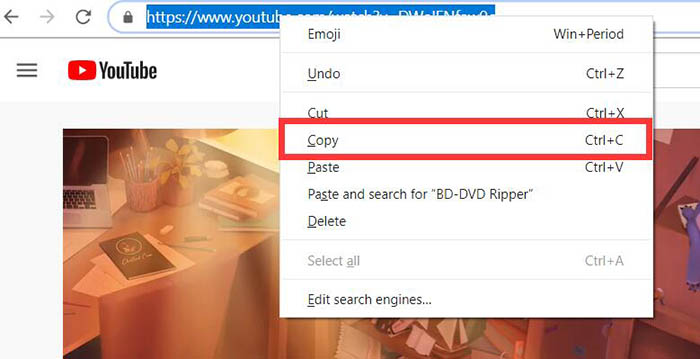
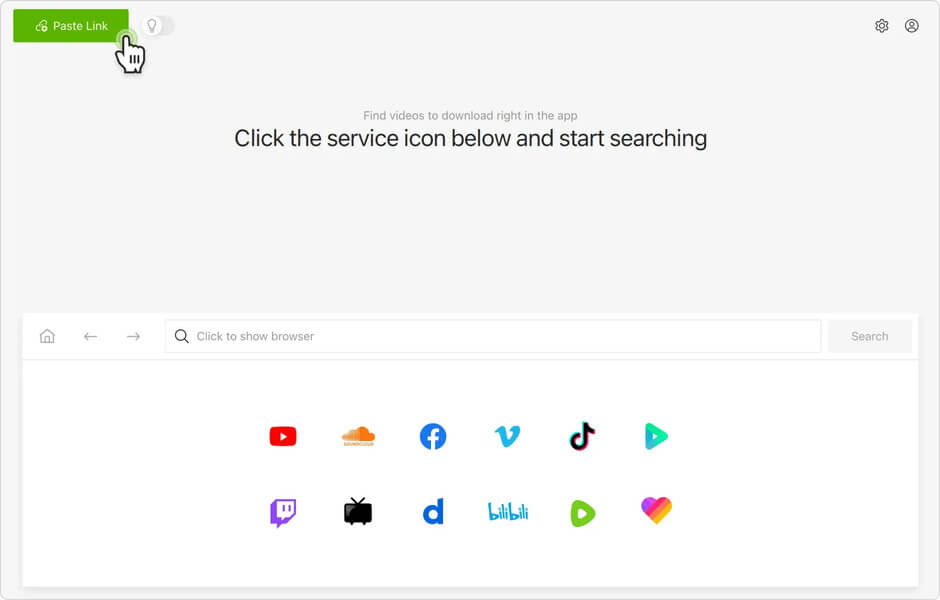
Étape 2. Collez l'URL de la vidéo HTML5 dans le téléchargeur de vidéos en ligne.
Ouvrez le Téléchargeur de vidéos en ligne Sur votre ordinateur, collez l'URL de la vidéo dans le champ « Copier et coller l'URL ici » et cliquez sur le bouton « Analyser » pour récupérer la vidéo HTML5.
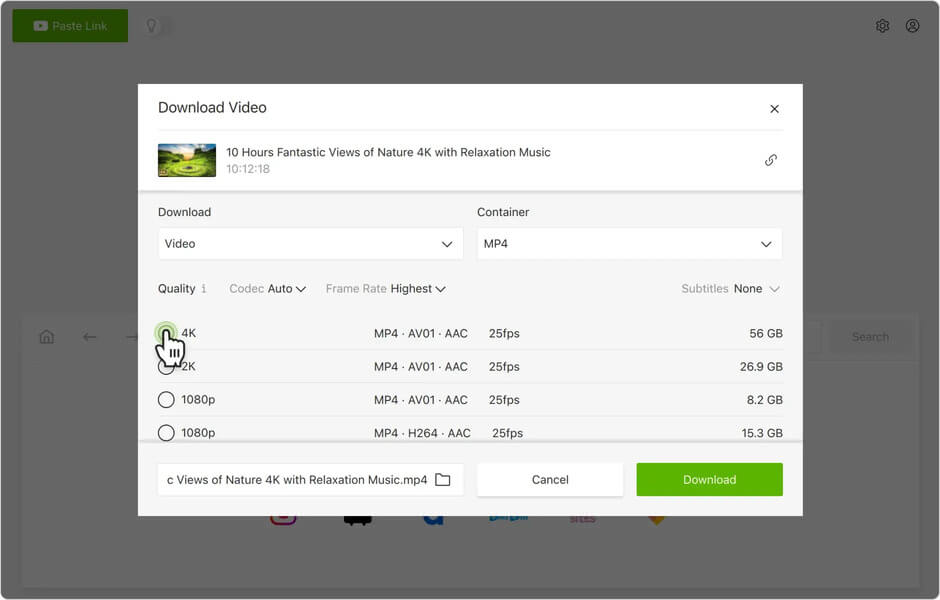
Étape 3. Sélectionnez le format de sortie à télécharger
Une fois la vidéo analysée et extraite, une fenêtre s'ouvrira affichant les options de téléchargement. Vous devrez alors choisir un format, puis cliquer sur le bouton « Télécharger ».
Comme vous pouvez le constater, plusieurs résolutions vidéo sont disponibles. Pour certaines vidéos, il est possible d'extraire l'audio en plusieurs qualités afin de le télécharger.
Étape 4. Téléchargez et regardez la vidéo HTML5
Une fois que vous aurez cliqué sur le bouton « Télécharger », la progression du téléchargement s'affichera. Si vous souhaitez télécharger d'autres résolutions ou la piste audio de la même vidéo, cliquez simplement sur le bouton « Analyser » et répétez l'étape 3. Vous pouvez également ajouter d'autres vidéos au téléchargement groupé.
Une fois le téléchargement terminé, rendez-vous dans la section « Terminé » pour trouver les vidéos ou les fichiers audio téléchargés. Si vous souhaitez visionner les vidéos téléchargées, cliquez sur le bouton « Ouvrir le dossier » pour les lire sur votre ordinateur.
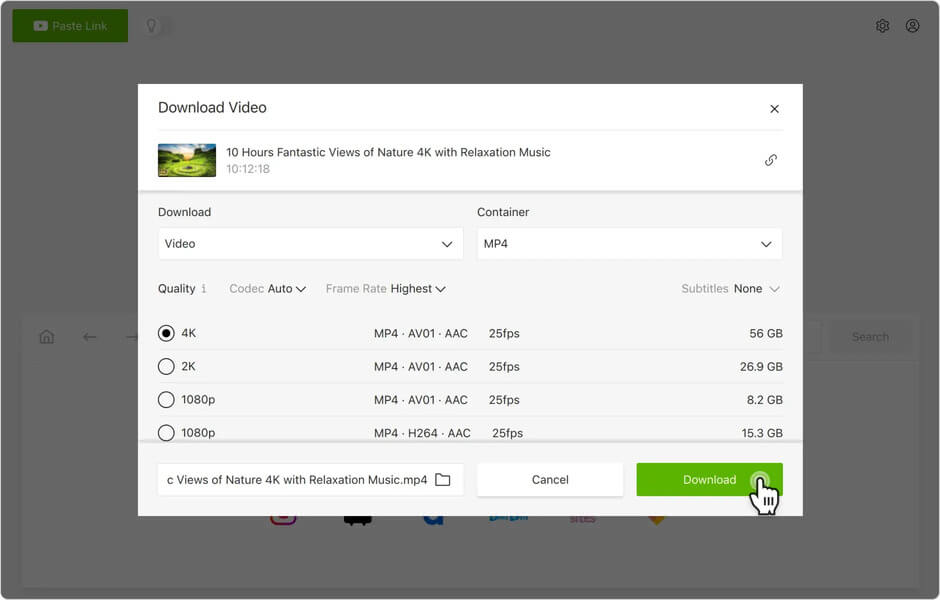
Par conséquent, avec Téléchargeur de vidéos en ligne Il vous suffit de quelques clics pour télécharger facilement des vidéos HTML5.
En suivant les étapes ci-dessus, vous maîtriserez rapidement le programme. Grâce à une technologie de téléchargement avancée, la vitesse de téléchargement est améliorée tout en préservant la haute qualité de la vidéo originale.
Téléchargement gratuit Téléchargement gratuit
Ce message vous a-t-il été utile ?
Cliquez sur une étoile pour donner votre avis !
Note moyenne / 5. Dénombrement des votes :



![Les 15 meilleurs sites web gratuits pour regarder des animes en ligne [2022]](https://www.getappsolution.com/images/website-anime-390x220.jpg)